
Ellipse and Hyperbola via 3D Vectors
Loading the math board and drawing, please wait…
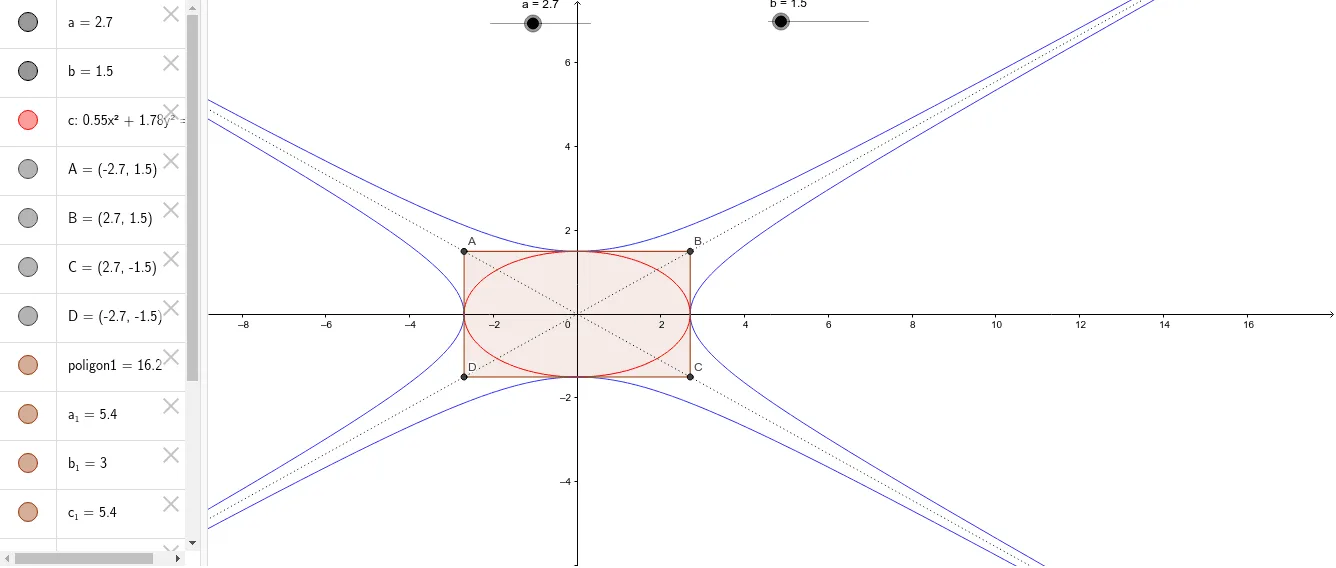
① This example demonstrates the geometric construction of an ellipse and a hyperbola within a three-dimensional vector framework, using polygons and lines. ② Core mathematical concepts include conic sections (ellipse and hyperbola), focus-directrix properties, three-dimensional vector operations, arithmetic mean in geometric contexts, and the use of a prism as an auxiliary solid. ③ Construction highlights: The GeoGebra commands Polygon and Line are used to create polygon poligon1 and points A, B, C, D, along with segments a, b, c; vectors a_1, b_1, c_1, d, e, f, g, h are defined to link spatial directions and lengths, enabling the generation of the conic curves within a 3D setting. ④ Suitable for high school to undergraduate courses in analytic geometry or 3D geometry, and useful for illustrating how conic sections can be represented through vectors and spatial projections, bridging algebraic equations and geometric intuition.
GeoGebra Commands & Parameters
Polygon(A, B, C, D) → poligon1, a_1, b_1, c_1, dLine(A, C) → eLine(D, B) → f
AI Drawing Prompt Reference
Construct an ellipse and a hyperbola in a 3D vector framework using polygons and lines. Begin by forming a quadrilateral and defining multiple vectors from it to connect spatial directions and lengths. Then, draw lines connecting the opposite corners of the quadrilateral, ultimately creating the conic curves within the 3D setting using these elements.
The prompt above was compiled from the original drawing commands and is for reference only.