
Build the net of a pyramid by Ivan De Winne
Loading the math board and drawing, please wait…
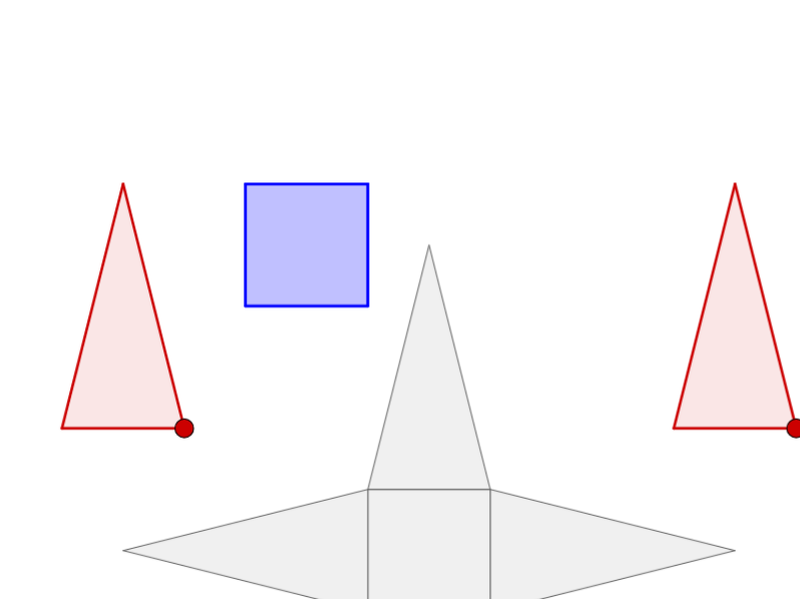
This example demonstrates how to construct the net of a pyramid by dragging red and blue faces onto a grey base net. It involves core math concepts like polygons, solid geometry, and vectors. Construction uses commands such as Polygon, Point, Midpoint, Intersect, Pyramid, Net, and Vector. Suitable for high school students learning solid geometry.
GeoGebra Commands & Parameters
Polygon(M, N, C_1) → poly3, n, q, rPoint(Circle[K_5, 1]) → L_5Polygon(K_5, L_5, M_5) → Vieleck1, m_5, k_5, l_5Point(Circle[N_5, 1]) → O_5Polygon(N_5, O_5, P_5) → Vieleck2, p_5, n_5, o_5Point(Circle[Q_5, 1]) → R_5Polygon(Q_5, R_5, S_5) → Vieleck3, s_5, q_5, r_5Point(Circle[T_5, 1]) → U_5Polygon(T_5, U_5, V_5) → Vieleck4, v_5, t_5, u_5Point(Circle[V_4, 2]) → W_4Midpoint(A_5, V_4) → J_5Point(Circle[F_4, 2]) → G_4Midpoint(I_4, F_4) → I_5Point(Circle[J_4, 2]) → K_4Midpoint(U_4, J_4) → H_5Midpoint(Z_4, W_4) → G_5Midpoint(H_4, G_4) → F_5Point(Circle[B_4, 2]) → C_4Midpoint(B_4, E_4) → E_5Midpoint(T_4, K_4) → D_5Intersect(zAxis, xAxis) → APoint(xAxis) → BPolygon(A, B, 4, xOyPlane) → poly1, f, g, h, i, C, DPyramid(poly1, 2) → a, E, Fläche1, Fläche2, Fläche3, Fläche4, Kante1, Kante2, Kante3, Kante4Point(Circle[B, Distance[A, B], Segment[A, B]]) → INet(a, c) → d, V_1, G_2, H_2, I_2, J_2, K_2, face1, face2, face4, face5, face3, W_1, face6, edge1, edge5, edge8, edge2, edge3, edge13, edge6, edge7, edge16, Z_1, edge9, edge10, edge17, edge11, edge12, edge18, edge4, edge15, A_2, B_2, C_2, D_2, E_2, F_2Net(a, o) → p, H_3, Q_3, R_3, S_3, T_3, U_3, face13, face14, face16, face17, face15, I_3, face18, edge39, edge43, edge46, edge40, edge41, edge51, edge44, edge45, edge54, J_3, edge47, edge48, edge55, edge49, edge50, edge56, edge42, edge53, K_3, L_3, M_3, N_3, O_3, P_3Polygon(Z_2, A_3, 4) → poly7, m_1, n_1, p_1, q_1, B_3, C_3Polygon(C_4, D_4, E_5) → poly9, j_1, k_1, l_1Polygon(G_4, H_4, I_5) → poly10, b_1, c_1, d_1Polygon(V_3, W_3, 4) → poly8, r_1, s_1, t_1, a_1, Z_3, A_4Polygon(W_4, Z_4, J_5) → poly12, e_1, f_2, g_2Polygon(K_4, T_4, H_5) → poly11, m, h_1, i_1Polygon(K, L, M) → poly2, j, k, lPolygon(L, O_2, Q_2) → poly4, e, f_1, g_1Polygon(N, O_2, R_2) → poly5, s, t, bPolygon(L, O_2, N, M) → poly6, l_2, o_3, n_4, m_3Polygon(T_2, U_2, P_2, Q_2) → poly13, t_2, u_2, p_3, q_3AreEqual(poly7, poly8) → CheckSquaresAreEqual(poly6, poly7) → check5Vector(B_5, C_5) → uVector(F, G) → v