
Effects of Dilations on Angles
Loading the math board and drawing, please wait…
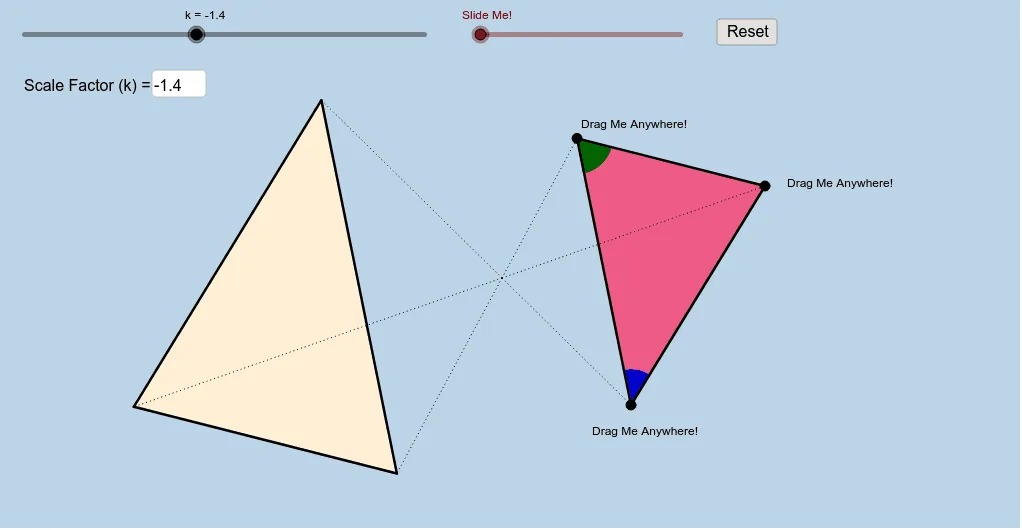
This interactive applet helps students discover why angles remain unchanged under similarity transformations. Key concepts include similarity transformations and angle invariance. It uses commands like polygon, vector, and angle in GeoGebra. Suitable for middle school and above students to learn the basic properties of similarity transformations.
GeoGebra Commands & Parameters
Polygon(A, B, C) → poly1, c, a, bSegment(A, B) → dSegment(B, C) → eSegment(C, A) → fTextfield(k) → InputBox1Dilate(A, k, O) → A'Dilate(B, k, O) → B'Dilate(C, k, O) → C'Polygon(A', B', C') → poly1', c', a', b'Dilate(A, k, O) → A'_1Dilate(B, k, O) → B'_1Segment(A'_1, B'_1) → d'Dilate(B, k, O) → B'_2Dilate(C, k, O) → C'_1Segment(B'_2, C'_1) → e'Dilate(C, k, O) → C'_2Dilate(A, k, O) → A'_2Segment(C'_2, A'_2) → f'Segment(O, A') → gSegment(O, A) → hSegment(O, B) → iSegment(O, B') → jSegment(O, C') → lSegment(O, C) → mCircle(A, 1) → pCircle(B, 1) → sIntersect(p, f, 1) → DIntersect(p, d, 1) → EIntersect(s, d, 1) → FIntersect(s, e, 1) → GCircleSector(A, D, E) → tCircleSector(B, F, G) → c_1Dilate(A, If[0 < n ≤ 1, 1 - n, 0], A') → A'_3Dilate(B, If[1 < n ≤ 2, 2 - n, 0], B') → B'_3Vector(B, B'_3) → uVector(A, A'_3) → vTranslate(t, v) → t'Translate(c_1, u) → d_1Angle(D, A, E) → αCircleSector(A, E, D) → e_1CircleSector(B, G, F) → f_1Translate(e_1, v) → g_1Translate(f_1, u) → h_1Dilate(A, If[0 < o ≤ 1, 1 - o, 0], A') → A'_4Vector(A, A'_4) → wDilate(B, If[2 < o ≤ 3, 3 - o, 0], B') → B'_4Vector(B, B'_4) → qTranslate(e_1, w) → rRotate(r, If[1 < o ≤ 2, (((o - 1) * 180))°, 180°], A') → r'Translate(f_1, q) → k_1Rotate(k_1, If[3 < o ≤ 4, (((o - 3) * 180))°, 180°], B') → p_1Translate(t, w) → t'_1Rotate(t'_1, If[1 < o ≤ 2, (((o - 1) * 180))°, 180°], A') → q_1Translate(c_1, q) → r_1Rotate(r_1, If[3 < o ≤ 4, (((o - 3) * 180))°, 180°], B') → s_1
AI Drawing Prompt Reference
Draw a triangle and a second triangle obtained by dilating the first about an external center point, with a variable scale factor controlled by an input box or slider. Connect the center to corresponding vertices with dashed lines to show the dilation. Place small circles at corresponding vertices and mark the angles with circular sectors to illustrate that angles remain unchanged under the transformation. Include dynamic arrows from original vertices to their dilated images to demonstrate the invariance of angles in a similarity transformation.
The prompt above was compiled from the original drawing commands and is for reference only.