
Effect of Coefficient on Exponential Function
Loading the math board and drawing, please wait…
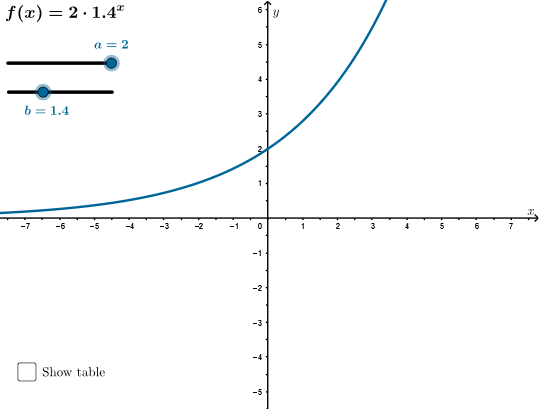
This example explores the graph and main characteristics of an exponential function with a coefficient. By adjusting the coefficient, the shape of the function graph can be observed. Key mathematical concepts include exponential functions, function graphs, and the impact of coefficients. GeoGebra commands used include Point, Sort, Sequence, and TableText. Suitable for high school mathematics education and learning.
GeoGebra Commands & Parameters
Point(xAxis) → ASort({(-1, p(-1)), (0, p(0)), (1, p(1)), (x(A), p(x(A)))}) → ptSequence(Segment[(0, y(Element[pt, s])), Element[pt, s]], s, 1, Length[pt]) → so, {1, 0, 1, 2.0378163750274427}Sequence(Segment[(x(Element[pt, s]), 0), Element[pt, s]], s, 1, Length[pt]) → sv, {1.4285714285714286, 2, 2.8, 3.9701973908839956}TableText({Join[{{"x"}, x(pt)}], Join[{{"f(x)"}, y(pt)}]}, "c|_") → testo3
AI Drawing Prompt Reference
Draw the graph of an exponential function with a coefficient, and mark several key points on the coordinate plane. Start by placing a movable point on the x-axis, then compute the function values at that point and at x = -1, 0, and 1. Sort these points by their x-coordinates. From each key point, draw vertical and horizontal dashed segments to the axes, creating a grid-like reference. Finally, display a table next to the graph listing the x-coordinates and corresponding function values, to illustrate how changing the coefficient affects the curve's shape.
The prompt above was compiled from the original drawing commands and is for reference only.