
Dynamic Incircle and Circumcircle with Growing Bubbles
Loading the math board and drawing, please wait…
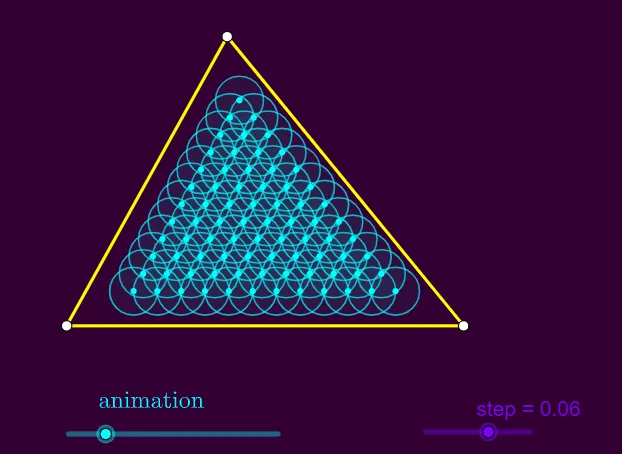
This example presents an original and engaging visualization of the incircle and circumcircle of a triangle using dynamically growing bubbles. It demonstrates the geometric relationships between circles and triangles in an interactive manner. Key mathematical concepts include circles, triangles, angles, geometric constructions, and transformations. The construction utilizes GeoGebra commands such as Flatten, Polygon, Sequence, AngularBisector, Intersect, Min, Distance, If, and Circle, along with Slider Animation objects to create the dynamic effect. Suitable for high school students and math enthusiasts to explore the properties of incircles and circumcircles.
GeoGebra Commands & Parameters
Flatten(Sequence[Sequence[(i * B) + (j * C), i, 0, 1, step], j, 0, 1, step]) → l1Polygon(A, B, C) → t1, c, a, bSequence(If[IsInRegion[Element[l1, k], t1], Element[l1, k]], k, 1, Length[l1]) → l2AngularBisector(A, C, B) → fAngularBisector(C, A, B) → gIntersect(f, g) → DMin(anim, 0.99) → dDistance(D, a) → rIf(Distance[E, a] > (d * r) ∧ Distance[E, b] > (d * r) ∧ Distance[E, c] > (d * r), Circle[E, (d * r)]) → eSequence(If[Distance[Element[l2, k], a] > (d * r) ∧ Distance[Element[l2, k], b] > (d * r) ∧ Distance[Element[l2, k], c] > (d * r), Circle[Element[l2, k], (d * r)]], k, 1, Length[l2]) → l3Sequence(If[Distance[Element[l2, k], a] > (d * r) ∧ Distance[Element[l2, k], b] > (d * r) ∧ Distance[Element[l2, k], c] > (d * r), {Circle[Element[l2, k], (d * r)], Element[l2, k]}], k, 1, Length[l2]) → l4Circle(D, (d * r)) → h
AI Drawing Prompt Reference
Visualize the incircle and circumcircle of a triangle using dynamically growing bubbles. Start by constructing a triangle and its sides, then find the angle bisectors to locate the incenter and circumcenter. Draw the incircle and circumcircle based on these points. Generate a series of bubbles inside and outside the triangle that grow dynamically, with their sizes related to the radii of the incircle and circumcircle, creating an engaging geometric display.
The prompt above was compiled from the original drawing commands and is for reference only.