
Dynamic Illustration of Trigonometric Ratios in a Right Triangle
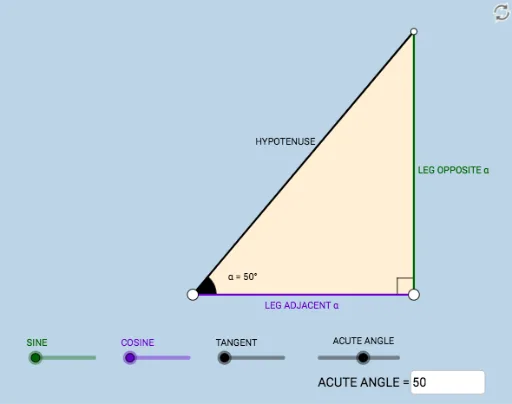
Loading the math board and drawing, please wait…
In collections
Sections 9.4 and 9.5__3 Trig Ratios
This example dynamically illustrates the three trigonometric ratios: sine, cosine, and tangent, within the context of a right triangle. By rotating and constructing angles, users can intuitively understand how these ratios change with the angle. The construction uses commands such as Segment, OrthogonalLine, Rotate, Angle, Ray, Circle, Intersect, Polygon, and Textfield. Suitable for students at the junior high school level and above, focusing on trigonometry and geometric construction.
GeoGebra Commands & Parameters
Segment(A, B) → fOrthogonalLine(B, f) → gRotate(B, (a * π / 180), A) → B'Angle(B, A, B') → αRay(A, B') → hCircle(B, 2) → cIntersect(c, g, 2) → CRay(B, C) → iIntersect(h, i) → DSegment(B, D) → jSegment(A, D) → kPolygon(A, B, D) → poly1, d, a_1, bRotate(B, If[0 < e ≤ 1, (-((e * (π / 2 - α)))), α - π / 2], D) → B'_1Rotate(D, If[0 < e ≤ 1, (-((e * (π / 2 - α)))), α - π / 2], D) → D'Segment(B'_1, D') → j'Rotate(A, If[0 < l ≤ 1, (α * l), α], A) → A'Rotate(B, If[0 < l ≤ 1, (α * l), α], A) → B'_2Segment(A', B'_2) → f'Rotate(B, If[0 < m ≤ 1, (m * π / 2), π / 2], B) → B'_3Rotate(D, If[0 < m ≤ 1, (m * π / 2), π / 2], B) → D'_1Segment(B'_3, D'_1) → j'_1Textfield(a) → InputBox1Angle(D, B, A) → β