
Dynamic Demonstration of the Area Formula for a Kite
Loading the math board and drawing, please wait…
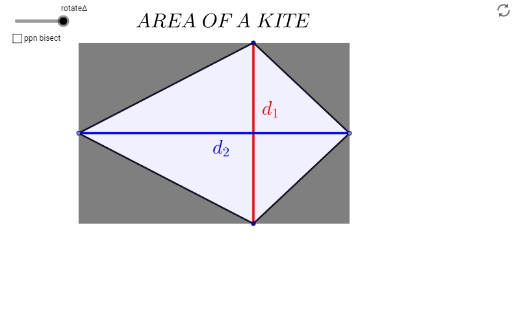
This GeoGebra example provides an interactive visual proof of the area formula for a kite, a quadrilateral with two pairs of adjacent equal sides and perpendicular diagonals. The core mathematical concepts include quadrilateral area, diagonal properties, triangle area, and rotational symmetry. The construction uses segment tools to draw the kite's sides, a line bisector to establish the symmetry axis, intersection points to define diagonals, and midpoint, rotate, and angle commands to transform parts of the kite into a rectangle or parallelogram of equal area. By rotating triangular sections, the example clearly shows that the kite's area equals half the product of its diagonals. This resource is ideal for middle school or high school geometry classes, serving as a dynamic demonstration for teachers or an interactive exploration for students to understand the derivation of the area formula.
GeoGebra Commands & Parameters
Segment(A, B) → ABLineBisector(AB) → bPoint(b) → CPoint(b) → DSegment(C, A) → cSegment(D, A) → dSegment(B, D) → eSegment(C, B) → fIntersect(b, AB) → EPolygon(C, E, A) → poly1, a_1, c_1, e_1Polygon(C, E, B) → poly2, b_1, c_2, e_2Polygon(A, E, D) → poly3, d_4, a_2, e_3Polygon(E, B, D) → poly4, d_3, e_4, b_2Midpoint(C, A) → FMidpoint(C, B) → GMidpoint(A, D) → HMidpoint(D, B) → IRotate(A, rotateΔ, H) → A'Rotate(E, rotateΔ, H) → E'Rotate(D, rotateΔ, H) → D'Polygon(A', E', D') → poly3', d', a', e'Rotate(C, rotateΔ, F) → C'Rotate(E, rotateΔ, F) → E'_1Rotate(A, rotateΔ, F) → A'_1Polygon(C', E'_1, A'_1) → poly1', a'_1, c', e'_1Rotate(C, rotateΔ, G) → C'_1Rotate(E, rotateΔ, G) → E'_2Rotate(B, rotateΔ, G) → B'Polygon(C'_1, E'_2, B') → poly2', b', c'_1, e'_2Rotate(E, rotateΔ, I) → E'_3Rotate(B, rotateΔ, I) → B'_1Rotate(D, rotateΔ, I) → D'_1Polygon(E'_3, B'_1, D'_1) → poly4', d'_1, e'_3, b'_1Segment(D, C) → CDMidpoint(A, E) → JMidpoint(D, C) → KAngle(C, E, A) → αMidpoint(E, B) → LSegment(A, E) → aSegment(E, B) → gSegment(C, E) → iSegment(D, E) → jPolygon(D, C, A) → poly5, a_3, d_5, c_3Polygon(D, C, B) → poly6, b_3, d_6, c_4
AI Drawing Prompt Reference
Draw a kite-shaped quadrilateral with two pairs of adjacent equal sides and perpendicular diagonals. Start by placing four vertices such that the kite is symmetric about one diagonal. Connect the vertices to form the kite. Then draw both diagonals, intersecting at a central point. Next, rotate each of the four triangular sections around the midpoint of their respective sides to rearrange them into a rectangle or parallelogram of equal area. Finally, label the diagonal lengths and rotation angles to show that the kite's area equals half the product of its diagonals.
The prompt above was compiled from the original drawing commands and is for reference only.