
Dynamic Demonstration of Rectangle Area and Perimeter
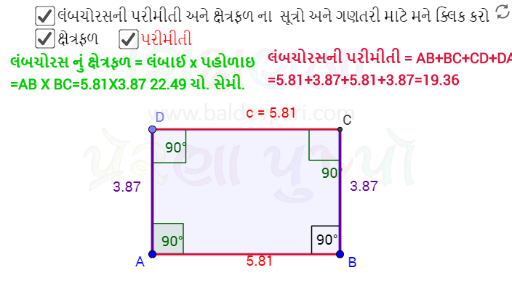
Loading the math board and drawing, please wait…
This interactive example demonstrates the dynamic calculation of rectangle area and perimeter. Key mathematical concepts involve rectangle properties, distance formulas, and polygon area. Construction utilizes GeoGebra commands including Segment for sides, OrthogonalLine for right angles, Point and Intersect for vertex positioning, Polygon to define the shape, Distance to measure lengths, Perimeter for total boundary, and Text objects to display real-time values. It is ideal for middle school geometry instruction, classroom demonstrations, or independent study of rectangular properties.
GeoGebra Commands & Parameters
Segment(A, B) → fOrthogonalLine(A, f) → gOrthogonalLine(B, f) → hPoint(g) → DOrthogonalLine(D, h) → iIntersect(i, h) → CSegment(D, C) → kSegment(C, B) → lAngle(C, B, A) → αAngle(B, A, D) → βAngle(A, D, C) → γAngle(D, C, B) → δPolygon(D, A, B, C) → Rectangle, d, a, b, cDistance(D, C) → distanceDCDistance(C, B) → distanceCBDistance(B, A) → distanceBADistance(A, D) → distanceADPerimeter(Rectangle) → perimeterRectanglePointIn(Rectangle) → PointRectangle