
Dynamic Demonstration of Inscribed Angles and Their Properties
Loading the math board and drawing, please wait…
In collections
Angles in Circles
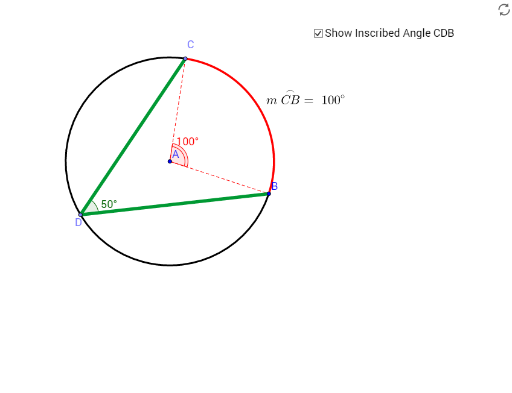
① This GeoGebra example provides an interactive visualization of inscribed angles, demonstrating that angles subtending the same arc are equal and that an inscribed angle is half the central angle. ② Core mathematical concepts include the inscribed angle theorem, central angles, arcs, chords, tangents, and intersecting lines, with emphasis on angle measurement and geometric reasoning. ③ Construction details: using GeoGebra commands such as Circle, Point, Segment, CircleArc, Angle, Line, Tangent, and Intersect, the construction includes a circle, points, segments, arcs, angles, lines, tangents, and intersection points, with multiple angle variables (α, β, γ, δ, ε, ζ, η) and a text label (text1) to dynamically display angle relationships. ④ Suitable for middle and high school geometry classes, particularly for teaching circle properties in grades 9-12, as a classroom demonstration or for student-led exploration of the inscribed angle theorem.
GeoGebra Commands & Parameters
Circle(A, B) → cPoint(c) → CSegment(C, A) → aSegment(A, B) → bCircleArc(A, C, B) → dCircleArc(A, B, C) → eAngle(B, A, C) → αPoint(d) → DSegment(B, D) → fSegment(C, D) → gAngle(B, D, C) → βPoint(d) → ESegment(C, E) → iSegment(B, E) → jAngle(B, E, C) → γLine(C, A) → lPoint(e) → GSegment(C, G) → nSegment(G, B) → pAngle(C, G, B) → δAngle(G, B, D) → εAngle(D, C, G) → ζTangent(C, e) → r,Tangent(B, e) → s,Intersect(s, r) → HSegment(C, H) → tSegment(H, B) → a_1Angle(C, H, B) → ηIntersect(c, l) → F, ISegment(C, I) → mPoint(e) → J