
Dynamic Demonstration of Dividing a Rectangle into Three Equal-Area Parts
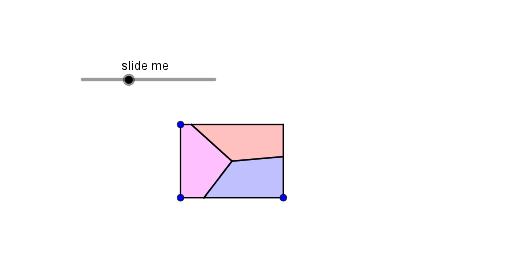
Loading the math board and drawing, please wait…
This interactive GeoGebra example dynamically demonstrates how to divide a rectangle into three parts of equal area. The core mathematical concepts involve area partitioning, geometric mean, right triangles, and root relationships. The construction uses commands such as Point, OrthogonalLine, Polygon, Midpoint, Segment, Circle, Centroid, Intersect, and Distance to build auxiliary polygons, circles, and perpendicular lines. By adjusting dynamic parameters, learners can visually explore the geometric construction that ensures equal areas. This resource is suitable for middle and high school geometry classes, helping students understand area division principles, geometric construction techniques, and the connection between geometric mean and area partitioning.
GeoGebra Commands & Parameters
Point(xAxis) → AOrthogonalLine(A, xAxis) → fPoint(f) → CPoint(xAxis) → BPolygon(C, D, B, A) → poly1, c, d, b, aMidpoint(c) → ISegment(C, I) → hCircle(D, a / 3) → k_1Point(h, i) → ECentroid(poly1) → FCircle(D, d / 3 + (Distance[C, E] * a / b)) → eIntersect(e, d, 1) → GPolygon(E, F, G, D) → poly2, e_1, f_1, g_1, d_1Intersect(k_1, g_1, 1) → JDistance(J, G) → kCircle(B, m) → gIntersect(g, b, 1) → HPolygon(H, F, G, B) → poly3, h_1, f_2, g_2, b_1Polygon(C, E, F, H, A) → poly4, c_1, e_2, f_3, h_2, a_1