
Area & Perimeter: Interactive Polygon Measurement Tool
Loading the math board and drawing, please wait…
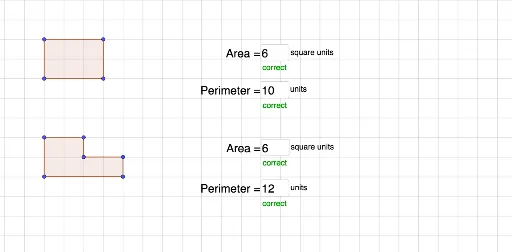
① This example demonstrates an interactive polygon area and perimeter measurement tool, where users can adjust side lengths or vertex positions via input boxes and observe real-time changes in area and perimeter values. ② Core mathematical concepts include polygon area calculation, perimeter definition, distance measurement, and dynamic linkage between variables and formulas. ③ Construction highlights: using GeoGebra commands such as Polygon to create polygon poly1, PointIn and Distance to compute side lengths and diagonal distances, Textfield and InputBox for user input, and text objects Textq1, Textpoly1, TextJH linked to values for dynamic updates. ④ Suitable for middle school to high school students learning geometric measurement and the integration of algebra with geometry, as well as for teachers demonstrating how area and perimeter vary with shape changes.
GeoGebra Commands & Parameters
Polygon(A, B, C, D) → q1, a_1, b_1, c_1, d_1Polygon(E, F, G, H, I, J) → poly1, e, f, g, h, i, jPointIn(q1) → Pointq1PointIn(poly1) → Pointpoly1Distance(a_1, d_1) → kDistance(b_1, c_1) → lDistance(J, H) → distanceJHTextfield(a) → InputBox1Textfield(b) → InputBox2Textfield(c) → InputBox3Textfield(d) → InputBox4
AI Drawing Prompt Reference
Draw a polygon with a quadrilateral and a hexagon. Adjust the side lengths of the quadrilateral using input boxes and observe changes in area and perimeter. Use the distance command to calculate the side lengths and diagonal distances of the quadrilateral. Adjust the vertex positions of the hexagon using input boxes. Dynamically display area, perimeter, and distance values.
The prompt above was compiled from the original drawing commands and is for reference only.