
Dynamic Demonstration of Corresponding Angles
Loading the math board and drawing, please wait…
In collections
Introduction to Geometry
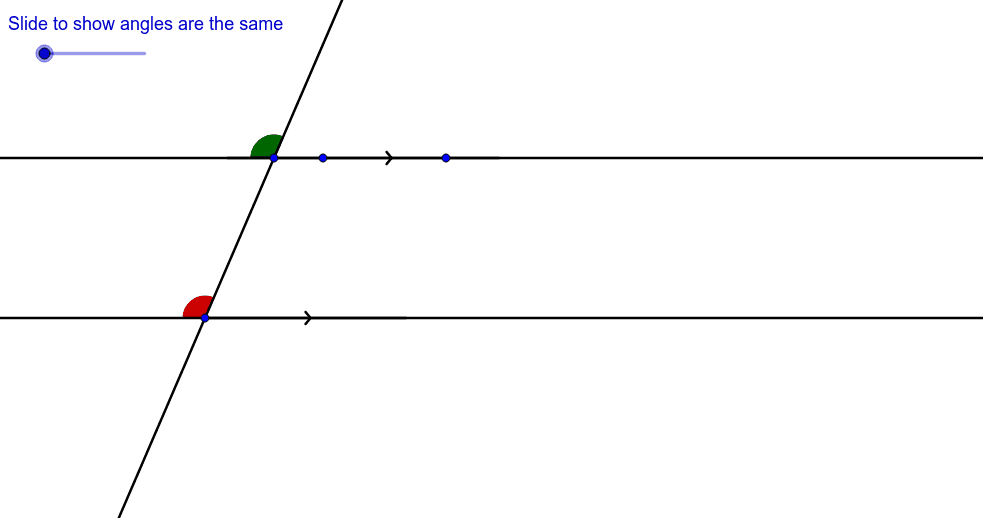
This GeoGebra example provides an interactive visual proof that corresponding angles are equal when a transversal intersects two parallel lines. The core mathematical concept is the corresponding angles theorem in Euclidean geometry, a fundamental property of parallel lines. The construction uses Line to draw the parallel lines and transversal, Circle and Intersect to locate key points, Ray and Point to define the angle sides, Angle to measure and display angles α, β, γ, and Vector, Segment, and Translate to create auxiliary parallel movements. A text label (text1) dynamically shows the angle measures. This resource is ideal for middle school geometry lessons, helping students grasp the concept of corresponding angles through hands-on exploration, and can be used by teachers for classroom demonstrations or by students for self-study.
GeoGebra Commands & Parameters
Line(B, A) → aCircle(A, B) → cIntersect(c, a, 2) → CRay(C, B) → eLine(E, a) → bPoint(e) → DLine(D, E) → dPoint(d) → FPoint(d) → GPoint(b) → HAngle(G, E, H) → αPoint(a) → IAngle(F, D, I) → βVector(D, E) → uPoint(a) → JPoint(b) → KSegment(D, J) → gSegment(E, K) → hTranslate(F, v) → F'Translate(D, v) → D'Translate(I, v) → I'Angle(I', D', F') → γSegment(I', D') → i
AI Drawing Prompt Reference
Draw two parallel lines and a transversal line that intersects them. At the intersection points, draw three rays and segments to form three angles. Use the angle measurement tool to display the degree measures of these angles. By translating one of the angles, dynamically demonstrate the principle of corresponding angles being equal.
The prompt above was compiled from the original drawing commands and is for reference only.