
Dynamic Construction of a Right Circular Cylinder in GeoGebra
Loading the math board and drawing, please wait…
In collections
Area, Surface Area, Volume--Nets
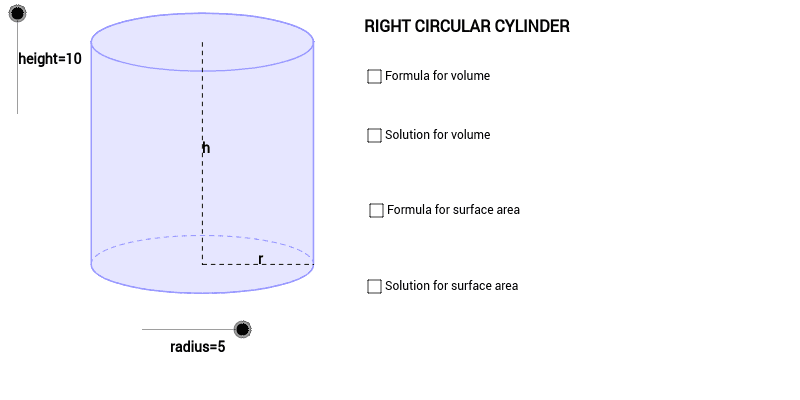
① This example demonstrates a 3D model of a right circular cylinder, including its net and cross‑sections. ② Core mathematical concepts: solid geometry of cylinders, volume and surface area formulas, vector translation and dilation transformations, construction with arcs and polygons. ③ Construction highlights: the model is built using GeoGebra commands Dilate, Vector, Translate, Arc, Polygon, Segment, and Midpoint, together with objects such as radius, height, c, A, B, and P to create the base circle, lateral rectangular net, and top circle. ④ Suitable for high‑school solid geometry lessons, introductory university geometric modeling, and advanced GeoGebra construction practice.
GeoGebra Commands & Parameters
Dilate(B, height, A) → CVector(A, C) → uTranslate(c, u) → dTranslate(R, u) → DTranslate(P, u) → ETranslate(L, u) → FArc(d, 0, 3.141592653589793) → eArc(c, 3.141592653589793, 0) → fPolygon(F, D, R, L) → Q, f_1, d_1, r_1, lSegment(E, P) → aSegment(P, R) → bMidpoint(E, P) → GMidpoint(P, R) → H
AI Drawing Prompt Reference
Draw a 3D model of a right circular cylinder, including its net and cross-sections. First draw a base circle, then use translation and dilation to create the lateral rectangular net, and finally draw the top circle. Ensure the model clearly shows concepts of volume and surface area.
The prompt above was compiled from the original drawing commands and is for reference only.