
Dynamic comparison of mean, median, mode and range for changing datasets
Loading the math board and drawing, please wait…
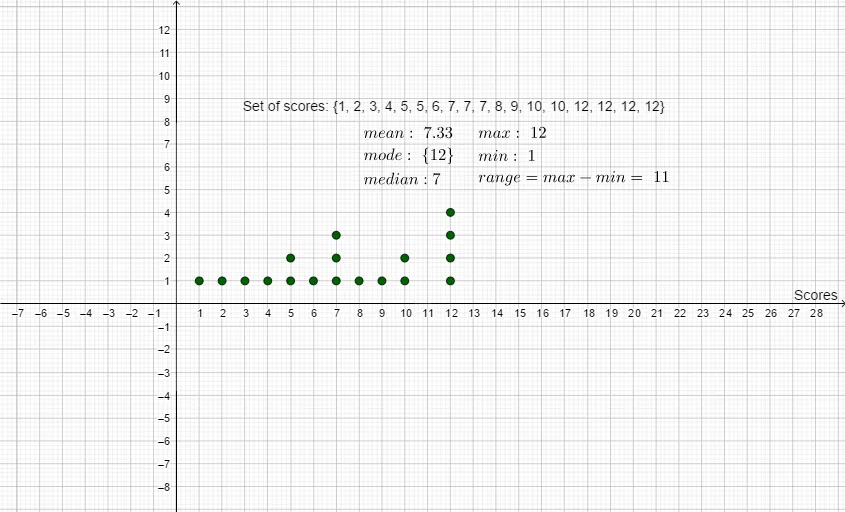
This example demonstrates how a dataset’s mean, median, mode, and range change as the underlying values are modified, using an interactive dot plot to reveal differences in how each statistic responds to data shifts. The key mathematics includes descriptive statistics—mean, median, mode, and range—and the contrasting robustness/sensitivity of these measures when discrete data are altered. Construction-wise, the visualization is built by first plotting the data as a DotPlot, then computing and displaying Median, mean, Mode, Max, and Min to derive and label the overall spread (range). The provided construction summary specifically uses the GeoGebra commands DotPlot, Median, mean, Mode, Max, and Min, along with text/label objects (e.g., result annotations) to show the computed values. Suitable for middle school through early college, it works well for probability & statistics lessons, introductory data analysis, and interactive classroom demonstrations.
GeoGebra Commands & Parameters
DotPlot(A) → l1Median(A) → amean(A) → bMode(A) → cMax(A) → dMin(A) → e
AI Drawing Prompt Reference
Create an interactive dot-plot comparison that illustrates how a discrete dataset’s mean, median, mode, and spread change as the underlying values are modified. First draw the dataset as a dot plot, with the data values adjustable (e.g., via sliders). Then compute and display the median, the mean, and the mode of the dataset, along with the maximum and minimum values, each shown with clear labels on the diagram. Arrange the construction in sequence: plot the dots first, derive and label the median/mean/mode, and finally show max and min to represent the overall range, so viewers can directly compare how each statistic responds to data shifts.
The prompt above was compiled from the original drawing commands and is for reference only.