
Drawing Triangles, Rectangles, and Rhombuses
Loading the math board and drawing, please wait…
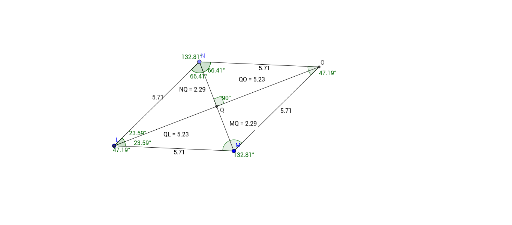
This example demonstrates how to draw triangles, rectangles, and rhombuses using GeoGebra. It covers the basic properties of these shapes and how to construct them using GeoGebra commands such as Segment, OrthogonalLine, Point, etc. Suitable for middle and high school students learning geometric construction and basic shape properties.
GeoGebra Commands & Parameters
Segment(A, B) → fOrthogonalLine(A, f) → gOrthogonalLine(B, f) → hPoint(g) → CLine(C, f) → iIntersect(i, h) → DSegment(C, A) → jSegment(C, D) → kSegment(D, B) → lAngle(D, B, A) → αAngle(A, C, D) → γSegment(C, B) → mSegment(D, A) → nIntersect(m, n) → EAngle(C, E, A) → βAngle(D, E, C) → δAngle(B, A, E) → εAngle(E, A, C) → ζDistance(C, E) → distanceCEDistance(D, E) → distanceDEDistance(B, E) → distanceBEDistance(E, A) → distanceEASegment(F, G) → pOrthogonalLine(F, p) → qOrthogonalLine(G, p) → rCircle(F, G) → cIntersect(c, q) → H, ILine(I, p) → sIntersect(s, r) → JSegment(I, F) → tSegment(I, J) → aSegment(J, G) → bAngle(G, F, I) → ηAngle(I, J, G) → θSegment(I, G) → dSegment(J, F) → eIntersect(d, e) → KAngle(K, I, J) → ιAngle(F, I, K) → κDistance(I, K) → distanceIKDistance(K, J) → distanceKJDistance(F, K) → distanceFKDistance(K, G) → distanceKGAngle(F, K, G) → λSegment(L, M) → f_1Circle(L, M) → c_1Point(c_1) → NSegment(N, L) → g_1Circle(N, Radius[c_1]) → d_1Circle(M, Radius[c_1]) → e_1Intersect(d_1, e_1) → O, P, ,Segment(N, O) → h_1Segment(M, O) → i_1Angle(M, L, N) → μAngle(L, N, O) → νAngle(O, M, L) → ξAngle(N, O, M) → οSegment(N, M) → j_1Segment(L, O) → k_1Intersect(j_1, k_1) → QDistance(N, Q) → distanceNQMidpoint(N, Q) →Distance(M, Q) → distanceMQMidpoint(M, Q) →Distance(Q, L) → distanceQLMidpoint(Q, L) →Distance(Q, O) → distanceQOMidpoint(Q, O) →Angle(O, Q, N) → ρAngle(M, L, Q) → σAngle(Q, L, N) → τAngle(L, N, Q) → υAngle(Q, N, O) → ϕ