
Drawing Histograms
Loading the math board and drawing, please wait…
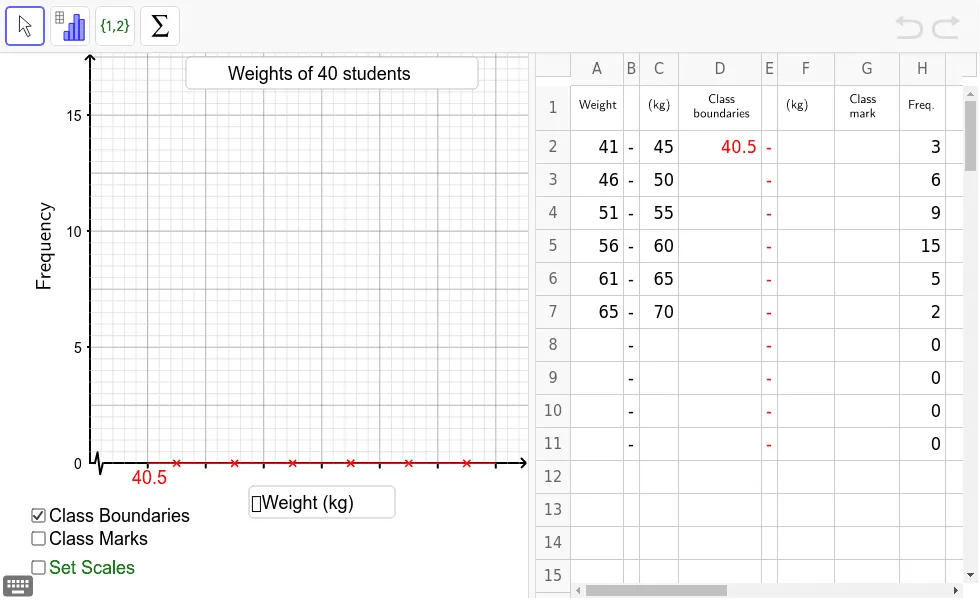
This example demonstrates how to use GeoGebra to draw a histogram representing grouped data. It covers core concepts like data grouping, frequency distribution, and histogram construction. The construction uses commands and objects such as If, Point, Polygon, PolyLine, Sequence, Textfield, and RotateText. It is suitable for middle school mathematics teaching to help students understand data visualization.
GeoGebra Commands & Parameters
If(C2 - A2 > 0, C2 - A2 + A3 - C2, 5) → kPoint(Ray[(1.5 * k, 0), (1.5 * k, 1)]) → Q1Point(Ray[(2.5 * k, 0), (2.5 * k, 1)]) → Q2Point(Ray[(3.5 * k, 0), (3.5 * k, 1)]) → Q3Point(Ray[(4.5 * k, 0), (4.5 * k, 1)]) → Q4Point(Ray[(5.5 * k, 0), (5.5 * k, 1)]) → Q5Point(Ray[(6.5 * k, 0), (6.5 * k, 1)]) → Q6Point(Ray[(7.5 * k, 0), (7.5 * k, 1)]) → Q7Point(Ray[(8.5 * k, 0), (8.5 * k, 1)]) → Q8Point(Ray[(9.5 * k, 0), (9.5 * k, 1)]) → Q9Point(Ray[(10.5 * k, 0), (10.5 * k, 1)]) → Q10Polygon((unitx, 0.3), (unitx, -0.3), (2.5 * unitx, -0.3), (2.5 * unitx, 0.3)) → poly1, a, b, c, dPolyLine((unitx, 0), (1.5 * unitx, h), (2 * unitx, -h), (2.5 * unitx, 0)) → eSequence(Polygon[(i * k, 0), ((i + 1) * k, 0), ((i + 1) * k, Element[list1, i]), (i * k, Element[list1, i])], i, 1, n - 1) → list2Sequence(Segment[(xmin + xint2 * i, ymax), (xmin + xint2 * i, ymin)], i, 1, (xmax - xmin) / xint2) → list3Sequence(Segment[(xmin, ymin + yint2 * i), (xmax, ymin + yint2 * i)], i, 1, (ymax - ymin) / yint2) → list4Sequence(Sequence[Segment[(xint2 * (j - 1) + xint1 * i, ymax), (xint2 * (j - 1) + xint1 * i, ymin)], i, 1, 4], j, 1, ceil(xmax / xint2)) → list5Sequence(Sequence[Segment[(xmin, (j - 1) * yint2 + yint1 * i), (xmax, (j - 1) * yint2 + yint1 * i)], i, 1, 4], j, 1, ceil(ymax / yint2)) → list6Sequence(Segment[(k * i + 0.5 * k, 0), (k * i + 0.5 * k, (-h) / 2.5)], i, 1, n - 1) → list9Sequence(Segment[(k * i, 0), (k * i, (-h) / 2.5)], i, 1, n) → list8Textfield(text23) → inputBox2Textfield(text24) → inputBox4Textfield(yint1') → inputBox1Textfield(xint1') → inputBox3RotateText("Frequency", 90*°) → text12
AI Drawing Prompt Reference
Draw a histogram with grouped data on the x-axis and frequency on the y-axis. Create several equal-width rectangles, each with height proportional to the frequency of its group. Above the rectangles, add a polyline connecting the midpoints of the top edges to form a frequency polygon. Below the chart, include tick marks and labels, plus a rotated 'Frequency' text label. Also add two input boxes for adjusting bin width and frequency scale. Keep the layout clear for educational purposes.
The prompt above was compiled from the original drawing commands and is for reference only.