
Drawing a T-Rex with Fourier Transform
Loading the math board and drawing, please wait…
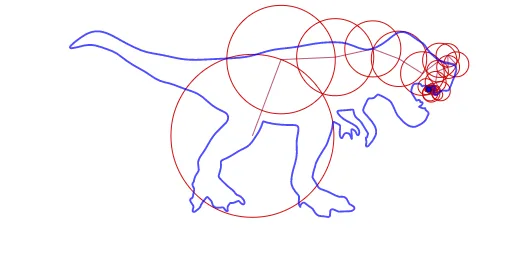
This example demonstrates how to draw a T-Rex using the Discrete Fourier Transform, involving core math concepts like Complex Numbers, Coordinate Geometry, Sequences, and Transformations. Key GeoGebra commands and objects used include Sequence, Reverse, Zip, First, Join, Last, PolyLine, Sum, and CurveCartesian, making it suitable for high school and above learners exploring the application of DFT.
GeoGebra Commands & Parameters
Sequence(N) → LNReverse(Sort[Zip[(abs(F), n), F, LF, n, LN]]) → LAsZip(y(As), As, LAs) → LjSequence(1, M) → LmFirst(Zip[Element[Lk, j], j, Lj], M) → LksFirst(Zip[Element[LF, j], j, Lj], M) → LFsFirst(Zip[x(As), As, LAs], M) → LRsZip(Sum[Zip[(abs(F); arg(F) + (k * t)), F, First[LFs, m], k, Lks]], m, Lm) → LC1Join({{(0, 0)}, LC1}) → LCLast(LC) → PlastPolyLine(LC) → PolyLZip(Circle[Element[LC, m], R], m, Lm, R, LRs) → EpicyclesSum(Zip[(x(F) * cos((k * x))) - (y(F) * sin((k * x))), F, LFs, k, Lks]) → fxSum(Zip[(x(F) * sin((k * x))) + (y(F) * cos((k * x))), F, LFs, k, Lks]) → fyCurveCartesian(fx(t), fy(t), t, 0, (2 * π)) → orbit
AI Drawing Prompt Reference
Draw a T-Rex using Fourier Transform by sorting and reversing complex number points, combining them with frequency coefficients, creating overlapping circular motion paths, and finally plotting the full trajectory formed by sine and cosine functions.
The prompt above was compiled from the original drawing commands and is for reference only.