
Drawing a Cube's Section
Loading the math board and drawing, please wait…
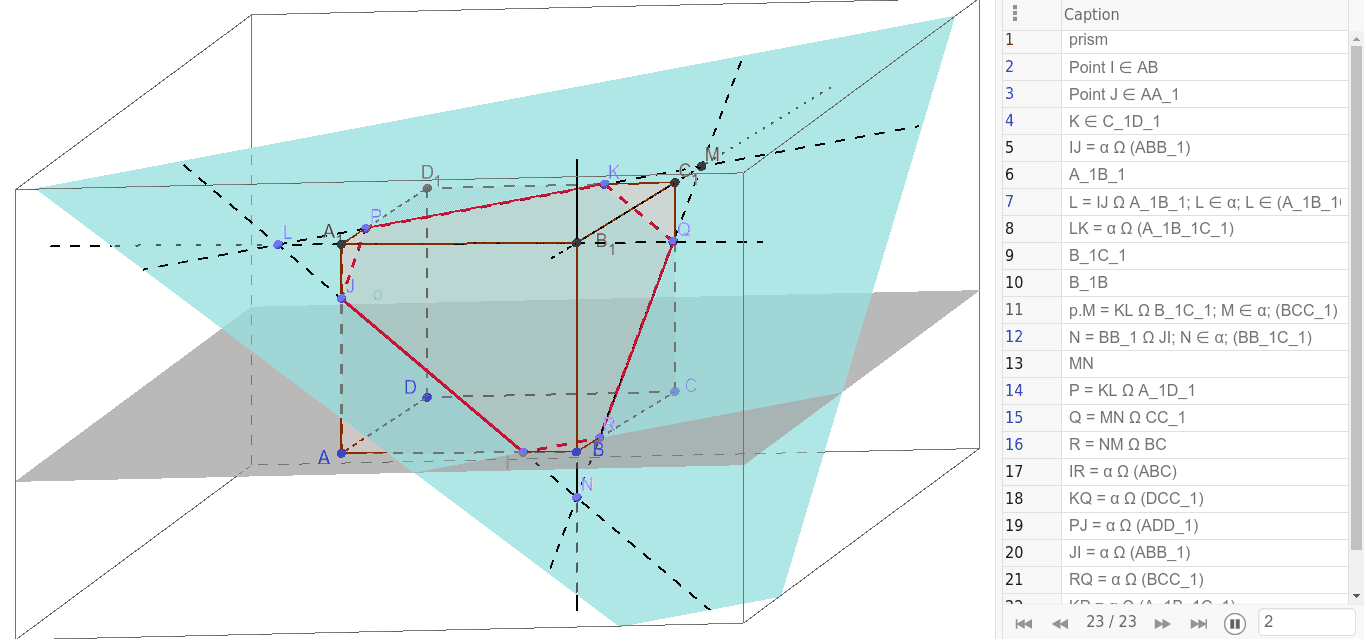
This example demonstrates how to use GeoGebra to draw a section of a cube. Key mathematical concepts include solid geometry and geometric construction. Commands such as Line, OrthogonalLine, Point, Segment, Polygon, Prism, Intersect, and Plane are used to construct the cube and its section. Suitable for middle school and above students or teachers.
GeoGebra Commands & Parameters
Line(A, B) → aOrthogonalLine(A, a, space) → bOrthogonalLine(A, a, space) → cOrthogonalLine(B, a, space) → dOrthogonalLine(D, a, space) → eLine(B, e) → fPoint(f) → CSegment(D, A) → hSegment(A, B) → iSegment(B, C) → jSegment(C, D) → kPolygon(A, B, C, D) → poly1, a_1, b_1, d_1, c_1Prism(poly1, 5) → l, A_1, edgeAE, edgeBF, edgeDG, edgeCH, edgeEF, edgeFG, edgeGH, edgeEH, B_1, C_1, D_1, faceABFE, faceBDGF, faceCDGH, faceACHE, faceEFGHPoint(a_1) → IPoint(edgeAE) → JPoint(edgeGH) → KLine(J, I) → gLine(B_1, A_1) → mPoint(m) → LLine(K, L) → nLine(B_1, C_1) → pLine(B_1, B) → qIntersect(p, n) → MPoint(g) → NLine(M, N) → rPoint(edgeEH) → PPoint(r) → QPoint(b_1) → RSegment(I, R) → sSegment(K, Q) → tSegment(J, P) → e_1Segment(J, I) → f_1Segment(I, R) → g_1Segment(R, Q) → h_1Segment(Q, K) → i_1Segment(K, P) → j_1Segment(P, J) → k_1Point(p) → EPlane(J, I, R) → oPolygon(I, R, Q, K, P, J) → poly2, i_2, r_1, q_1, k_2, p_1, j_2
AI Drawing Prompt Reference
Draw a cube and its section. Start by constructing the edges and vertices of the cube, then use orthogonal lines to determine the section's position. Connect the section vertices with line segments to form a polygon, refining the shape with intersections of edges and section points. Finally, combine the section with the cube to clearly show its internal structure.
The prompt above was compiled from the original drawing commands and is for reference only.