
Draw a Parabola Given Focus and Directrix
Loading the math board and drawing, please wait…
In collections
Geom. & Alg.: Quadratics
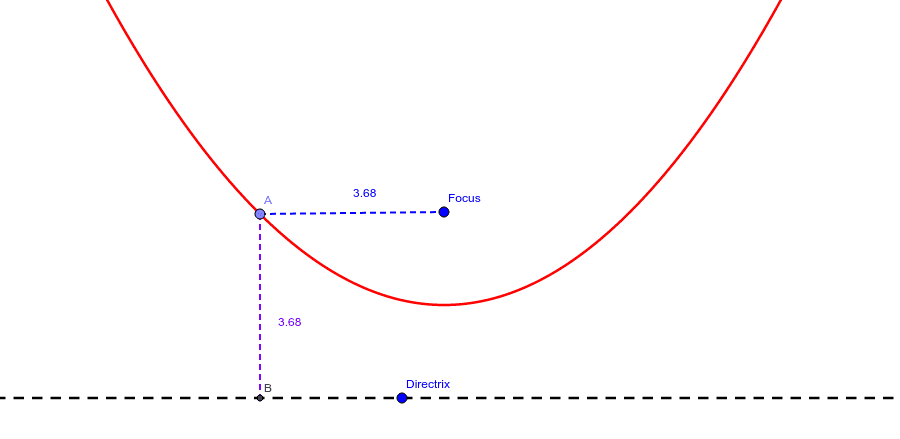
This example demonstrates how to create a new quadratic function parabola by moving the focus and directrix. Move point A and observe the indicated distances to understand the definition of a parabola. Key math concepts include the definition of a parabola, quadratic functions, and their geometric representation. Construction highlights the use of GeoGebra commands and objects like Line, Point, OrthogonalLine, Segment, Intersect, and Distance. Suitable for high school coordinate geometry instruction and function graphing learning.
GeoGebra Commands & Parameters
Line(Directrix, xAxis) → aPoint(f) → AOrthogonalLine(A, a) → bSegment(A, Focus) → cIntersect(b, a) → BSegment(A, B) → dDistance(d, c) → e
AI Drawing Prompt Reference
Draw a parabola with a focus and directrix. The directrix is a horizontal line parallel to the x-axis. Move the focus point and draw a perpendicular line from the focus to the directrix. Find the intersection point of this perpendicular with the directrix. The line segment connecting the focus and this intersection point represents the parabola, demonstrating that all points on it are equidistant from the focus and directrix.
The prompt above was compiled from the original drawing commands and is for reference only.