
Double Number Line: Percent of a Number
Loading the math board and drawing, please wait…
In collections
Percents, Decimals, Fractions
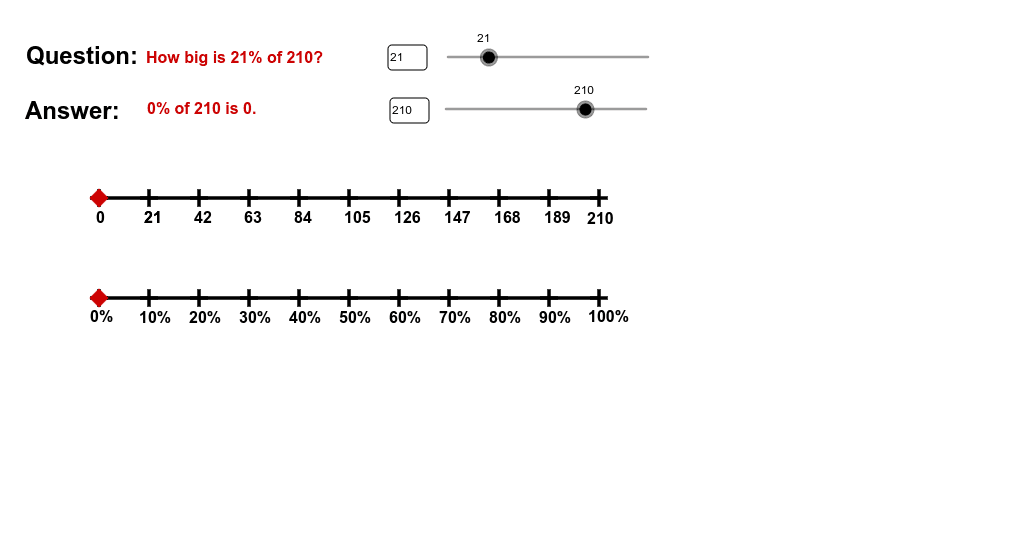
This example demonstrates how to calculate the percentage of a number using a number line. Key math concepts include percentage calculation, number line application, and fraction/decimal conversion. It is constructed using GeoGebra commands like Sequence, Segment, Point, and Textfield to create axes, mark value points, and display results. Suitable for middle school mathematics teaching to visually aid students in understanding percentage concepts and calculations.
GeoGebra Commands & Parameters
Sequence(A + (B - A) / 10 * j, j, 1, 9) → list1Sequence(C + (B - A) / 10 * j, j, 1, 9) → list2Segment(C, D) → aSegment(A, B) → bPoint(b) → ETextfield(c) → inputBox1Textfield(n) → inputBox2
AI Drawing Prompt Reference
Draw a horizontal number line with ten equally spaced points marked from start to end. Create two parallel lines above and below the number line, marking corresponding equally spaced points on each. Input a value in a text box on the number line, calculate its percentage, and display the result in another text box. Connect key points on the number line with line segments.
The prompt above was compiled from the original drawing commands and is for reference only.