
Double Integral Over a Rectangle
Loading the math board and drawing, please wait…
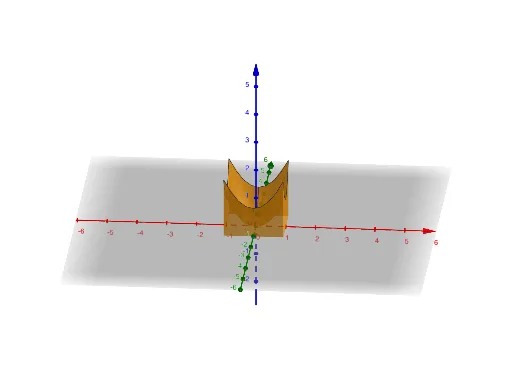
This GeoGebra example visualizes the computation of a double integral over a rectangular region, illustrating the relationship between a two-dimensional integral and a three-dimensional surface. Core mathematical concepts include double integrals, definite integration, rectangular domains, and surface volume representation. The construction employs the Surface command along with point objects a–f that define the rectangle's vertices and function parameters, providing an interactive tool to explore how the integration area corresponds to the resulting solid. It is suitable for high school calculus introduction and university multivariable calculus courses as a teaching aid.
GeoGebra Commands & Parameters
Surface(1, t, ((1 + t^(2)) * v), t, -1, 1, v, 0, 1) → bSurface(-1, t, ((1 + t^(2)) * v), t, -1, 1, v, 0, 1) → cSurface(t, 1, ((1 + t^(2)) * v), t, -1, 1, v, 0, 1) → dSurface(t, -1, ((1 + t^(2)) * v), t, -1, 1, v, 0, 1) → eSurface(s, t, 0, s, -1, 1, t, -1, -1) → f
AI Drawing Prompt Reference
Draw a three-dimensional surface composed of four curved surfaces. These surfaces represent the function value over a rectangular region where x and y range from -1 to 1, and the function is (1 + t^2) times v. The surfaces are connected through parameters t and v, forming a 3D surface. The graphic should clearly show the relationship between the rectangular region and the surface, helping to understand the connection between double integrals and 3D graphics.
The prompt above was compiled from the original drawing commands and is for reference only.