
Division of a Pizza Slice I: Dynamic Ratio and Derivative Visualization
Loading the math board and drawing, please wait…
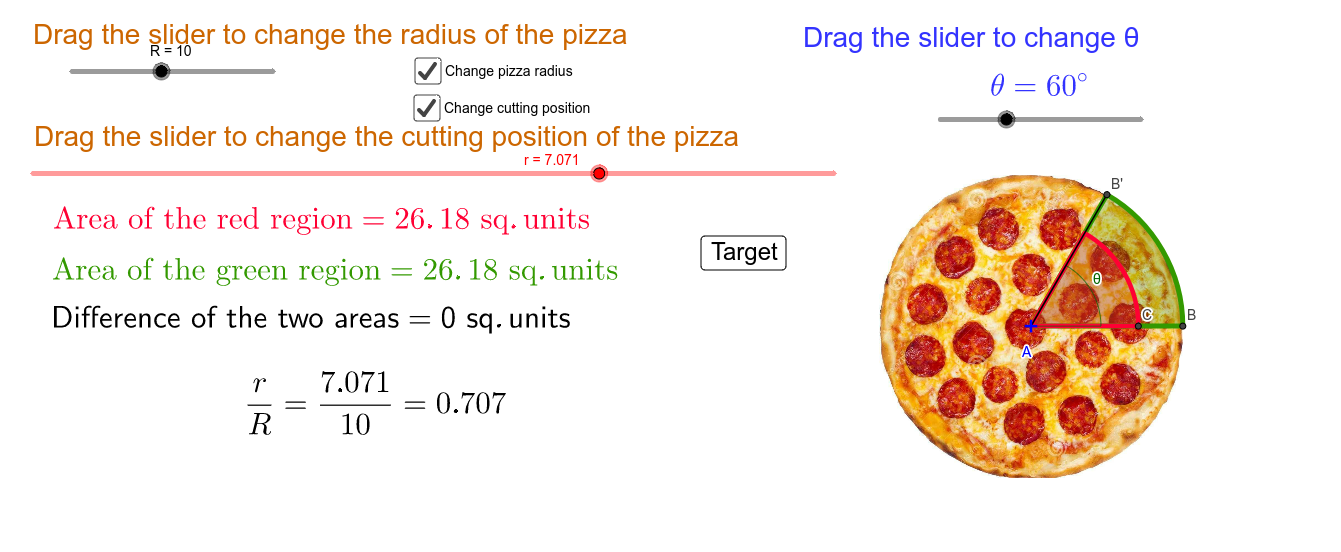
① This example demonstrates how to divide a pizza slice (a circular sector) into proportional parts, and dynamically visualizes how the division ratio, angles, and areas change. ② Core mathematical concepts include sector area, angle proportion, percentages, right-triangle trigonometry, and the idea of derivative as a rate of change when a slider adjusts parameters. ③ Construction highlights: using GeoGebra commands such as Rotate, CircleSector, Circle, Segment, and Intersect; objects include center, radius, angle variable θ, division points A/B/C, and text objects (text1–text9) for live numeric feedback; a slider controls the angle or ratio, and a button may reset or toggle states. ④ Suitable for upper secondary or pre-university students to explore geometric division, proportional reasoning, and the concept of derivative in a dynamic setting, ideal for math lab activities or inquiry-based learning.
GeoGebra Commands & Parameters
Rotate(B, θ°, A) → B'Angle(B, A, B') → αCircleSector(A, B, B') → cCircle(A, C) → dSegment(A, B') → aIntersect(d, a) → E,CircleSector(A, C, E) → e
AI Drawing Prompt Reference
Draw a circular pizza slice as a sector with a fixed center and a radius segment. Rotate one radius around the center by an angle controlled by a slider, creating a dynamic sector. Inside the sector, draw a ray from the center that intersects an auxiliary circle centered at the same point, dividing the sector into two parts. Shade or color the two sub-sectors differently, and display live numeric labels for the division ratio, angle, and areas that update as the slider moves. Show the geometric proportion and dynamic change.
The prompt above was compiled from the original drawing commands and is for reference only.