
Distance on a Segment and Arc
Loading the math board and drawing, please wait…
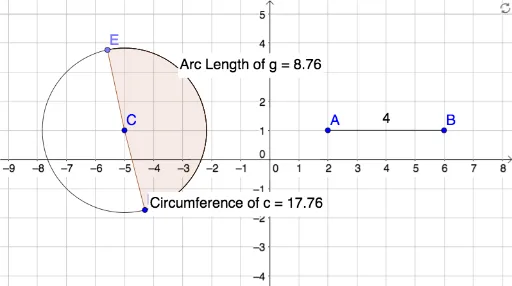
This example demonstrates how to measure the distance between a segment and an arc in a geometric figure. It involves core mathematical concepts such as functions, real numbers, inequalities, and arithmetic operations. Using GeoGebra commands like Segment, Circle, Point, etc., it constructs segments and arcs and calculates their distances. Suitable for middle school and above students or teachers.
GeoGebra Commands & Parameters
Segment(A, B) → fCircle(C, D) → cPoint(c) → ECircleArc(C, D, E) → dCircleSector(C, D, E) → eCircleArc(C, D, E) → gLength(g) → aPointIn(g) → PointgCircumference(c) → circumferencecPointIn(c) → Pointc
AI Drawing Prompt Reference
Draw a line segment. Then create a circle with a center point and a radius endpoint. Pick a point on the circle, and use the center, radius endpoint, and that point to construct a circular arc and its corresponding sector. Construct another arc in the same way and measure its length. Place a point on the arc, measure the circumference of the circle, and place another point on the circle. The figure shows the distance relationship between the segment and the arc, including the circle, arcs, sector, and key points.
The prompt above was compiled from the original drawing commands and is for reference only.