
Create Parallel and Perpendicular Lines
Loading the math board and drawing, please wait…
In collections
Advanced Geometry 1st 9 Weeks Standards
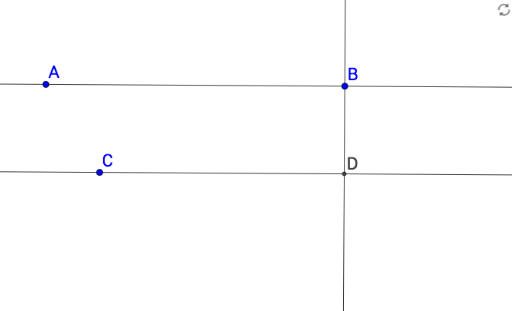
This example demonstrates how to construct a line parallel to a given line through a point, and a line perpendicular to a given line through another point, using GeoGebra's geometric construction tools. The core mathematical concepts are the parallel postulate and perpendicularity in Euclidean plane geometry, including the relationships between slopes and the properties of right angles. Construction steps: use the Line command to define a base line f through points A and B; apply the OrthogonalLine command to create line g through point C perpendicular to f, and line h through point D parallel to f; finally, use the Intersect command to find the intersection point D of g and f, clearly marking the foot of the perpendicular. This activity is suitable for middle school geometry lessons to illustrate basic constructions, and for high school coordinate geometry to visualize linear equations and relative positions of lines.
GeoGebra Commands & Parameters
Line(A, B) → fLine(C, f) → gOrthogonalLine(B, f) → hIntersect(h, g) → D
AI Drawing Prompt Reference
Draw a line g through point C parallel to line f, and another line h through point D perpendicular to line f. Then find the intersection point D of line g and line f, marking it clearly to show parallel and perpendicular relationships.
The prompt above was compiled from the original drawing commands and is for reference only.