
Distance Between Two Lines
Loading the math board and drawing, please wait…
In collections
学习 GeoGebra 经典应用
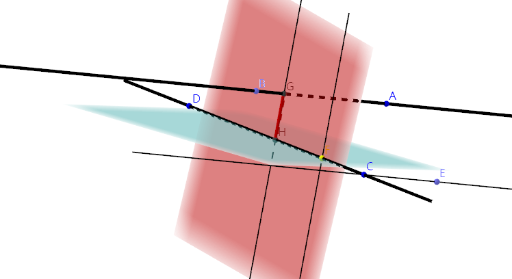
This example demonstrates the concept of distance between two lines in geometry. It involves the use of straight lines and distance concepts. Using GeoGebra commands and objects, users can create a line and a point, and then calculate the distance between them. This example is suitable for middle school or high school students learning geometry and distance concepts.
GeoGebra Commands & Parameters
Point(zAxis) → BLine(A, B) → aLine(C, D) → bLine(C, a) → cPoint(c) → EPlane(D, C, E) → dPoint(b) → FOrthogonalLine(F, d) → ePlane(C, e) → fIntersect(a, f) → GOrthogonalLine(G, d) → gIntersect(g, d) → HSegment(G, H) → h
AI Drawing Prompt Reference
Create a geometry diagram illustrating the distance between two lines. First, define two reference straight lines in space and set their relative positions. Then choose a point obtained from a construction involving one line, and form a plane using that point together with the needed geometric references so that the plane intersects the other line. From the intersection point, draw an orthogonal line to the corresponding plane, and intersect this orthogonal line with the plane to get a second point. Connect the two intersection points with a segment to represent the distance between the lines.
The prompt above was compiled from the original drawing commands and is for reference only.