
Distance Between Two Lines by GeoGebra Team
Loading the math board and drawing, please wait…
In collections
Learn GeoGebra Classic
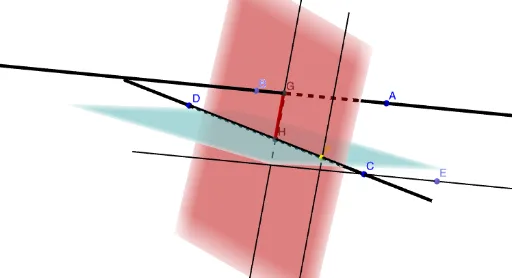
This example demonstrates how to calculate the distance between two lines. Key mathematical concepts include line equations and distance formulas. Using GeoGebra commands such as Point, Line, Intersect, and Segment, the intersection points and distances between the lines are visually demonstrated. Suitable for high school mathematics education and learning.
GeoGebra Commands & Parameters
Point(zAxis) → BLine(A, B) → aLine(C, D) → bLine(C, a) → cPoint(c) → EPlane(D, C, E) → dPoint(b) → FOrthogonalLine(F, d) → ePlane(C, e) → fIntersect(a, f) → GOrthogonalLine(G, d) → gIntersect(g, d) → HSegment(G, H) → h
AI Drawing Prompt Reference
Draw two lines and calculate the distance between them. First, draw line a through point A and point B, then draw line b through point C and point D. Next, draw a perpendicular line to line a from point C, intersecting at point E, and then draw plane d with points D, C, and E as the base. From point F (a point on line b), draw a perpendicular line to plane d, intersecting at point G, and then draw another perpendicular line from G to plane d, intersecting at point H. Finally, connect points G and H to form segment h, which represents the distance between the two lines.
The prompt above was compiled from the original drawing commands and is for reference only.