
Discover the Area Formula for a Triangle
Loading the math board and drawing, please wait…
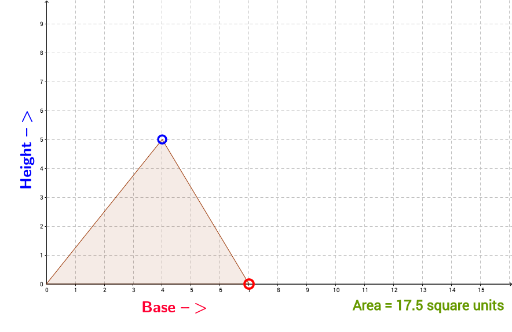
This example demonstrates how to derive the area formula for a triangle using coordinate geometry. Key math concepts involved include coordinates, polygons, segments, and rotations. GeoGebra commands and objects used in the construction are Intersect (intersection), Point (point), Polygon (polygon), Segment (segment), PointIn (point inside object), and RotateText (rotate text). Suitable for middle school and above students to learn and understand the derivation of the triangle area formula.
GeoGebra Commands & Parameters
Intersect(xAxis, yAxis) → APoint(xAxis) → CPolygon(A, B, C) → poly1, c, a, bIntersect(c, b) → DPoint(xAxis) → ESegment(D, E) → dPointIn(poly1) → Pointpoly1RotateText("Height -->", 90°) → text1RotateText("Base -->", 0°) → text2
AI Drawing Prompt Reference
Draw a coordinate system with the x-axis and y-axis. Mark point C on the x-axis and point A on the y-axis. Construct a triangle with vertices A, B, and C, and mark a point P inside the triangle. Connect C to B, then connect B to point E on the x-axis, forming segment DE. Rotate the text 'Height -->' 90 degrees and 'Base -->' 0 degrees, and place them on segments DE and AB respectively.
The prompt above was compiled from the original drawing commands and is for reference only.