
Dilation Transformation Demo by robertcartwright
Loading the math board and drawing, please wait…
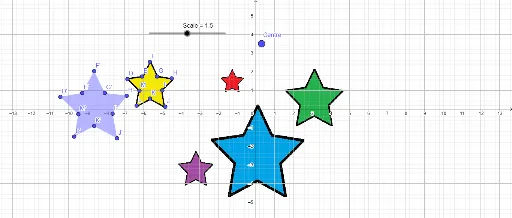
This example demonstrates the effect of a dilation transformation on a shape, involving core concepts like similarity transformation, scale factor, central symmetry, and polygon properties. It uses GeoGebra commands Polygon and Dilate, with objects such as Scale, D (center), and various points and polygons. Suitable for high school students learning about the properties and applications of similarity transformations.
GeoGebra Commands & Parameters
Polygon(D, E, F, G, H, I, J, K, L, M) → poly1, d, m, e, f, g, h, i, j, k, lDilate(E, Scale, Centre) → E'Dilate(F, Scale, Centre) → F'Dilate(G, Scale, Centre) → G'Dilate(H, Scale, Centre) → H'Dilate(I, Scale, Centre) → I'Dilate(J, Scale, Centre) → J'Dilate(K, Scale, Centre) → K'Dilate(L, Scale, Centre) → L'Dilate(M, Scale, Centre) → M'Dilate(D, Scale, Centre) → D'Polygon(D', E', F', G', H', I', J', K', L', M') → poly1', d', m', e', f', g', h', i', j', k', l'
AI Drawing Prompt Reference
Draw a polygon with ten vertices. Choose a point inside it as the center of dilation. Apply a dilation transformation with a given scale factor to all vertices, producing a second polygon whose corresponding vertices lie on lines through the center and whose sides are parallel to the original. Show the center point, the scale factor value, and label all vertices of both polygons clearly to illustrate the dilation effect.
The prompt above was compiled from the original drawing commands and is for reference only.