
Dilation Transformation Demo by Paige Adams Schneider
Loading the math board and drawing, please wait…
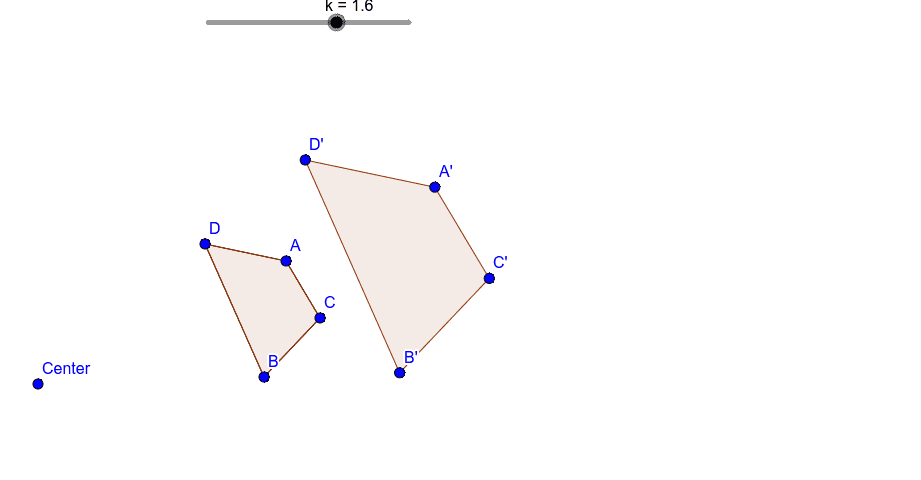
This example demonstrates the effect of dilation transformation on shapes, visually showing how the center point and scale factor influence the shape's size and form. Core mathematical concepts include transformation, similar figures, proportional relationships, and the transformation of special points. Construction highlights involve using GeoGebra commands like Segment, Polygon, and Dilate to draw and manipulate objects A, B, C, D, f, g, h, i, k, Center, poly1, a, c, b, d, A', C', B', D', poly1', a', c', b', d'. Suitable for middle school students and above learning geometric transformations, similarity, and dynamic geometry.
GeoGebra Commands & Parameters
Segment(A, C) → fSegment(C, B) → gSegment(B, D) → hSegment(D, A) → iPolygon(A, C, B, D) → poly1, a, c, b, dDilate(A, k, Center) → A'Dilate(C, k, Center) → C'Dilate(B, k, Center) → B'Dilate(D, k, Center) → D'Polygon(A', C', B', D') → poly1', a', c', b', d'
AI Drawing Prompt Reference
Draw a quadrilateral and then scale it from one of its vertices by a certain factor to create a new quadrilateral, showing the relationship between the original and the scaled shape, and connect the corresponding vertices with lines to illustrate similarity and proportionality.
The prompt above was compiled from the original drawing commands and is for reference only.