
Dilation: Reduce or Enlarge a Polygon
Loading the math board and drawing, please wait…
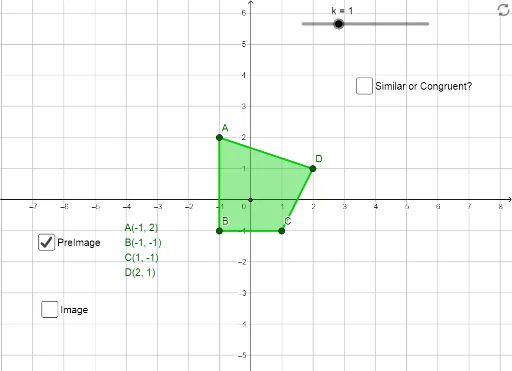
This GeoGebra example demonstrates the dynamic process of dilating (scaling) a polygon to reduce or enlarge it. The core mathematical concept is homothety (central similarity), where every point of the original shape moves along a line through a fixed center (point E) by a scale factor k, producing a similar image. The construction uses the Polygon command to create the original quadrilateral poly1, and the Dilate command with center E and variable factor k (controlled by a slider) to generate the dilated polygon poly1'. All corresponding vertices (A', B', C', D') and sides are preserved, with text labels showing the transformation. This resource is ideal for middle and high school students learning geometric transformations, similarity, and proportional reasoning, as well as for teachers demonstrating how scaling affects size, position, and side-length ratios in an interactive way.
GeoGebra Commands & Parameters
Polygon(A, B, C, D) → poly1, a, b, c, dIntersect(xAxis, yAxis) → EDilate(A, k, E) → A'Dilate(B, k, E) → B'Dilate(C, k, E) → C'Dilate(D, k, E) → D'Polygon(A', B', C', D') → poly1', a', b', c', d'