
Dilation of Similar Figures
Loading the math board and drawing, please wait…
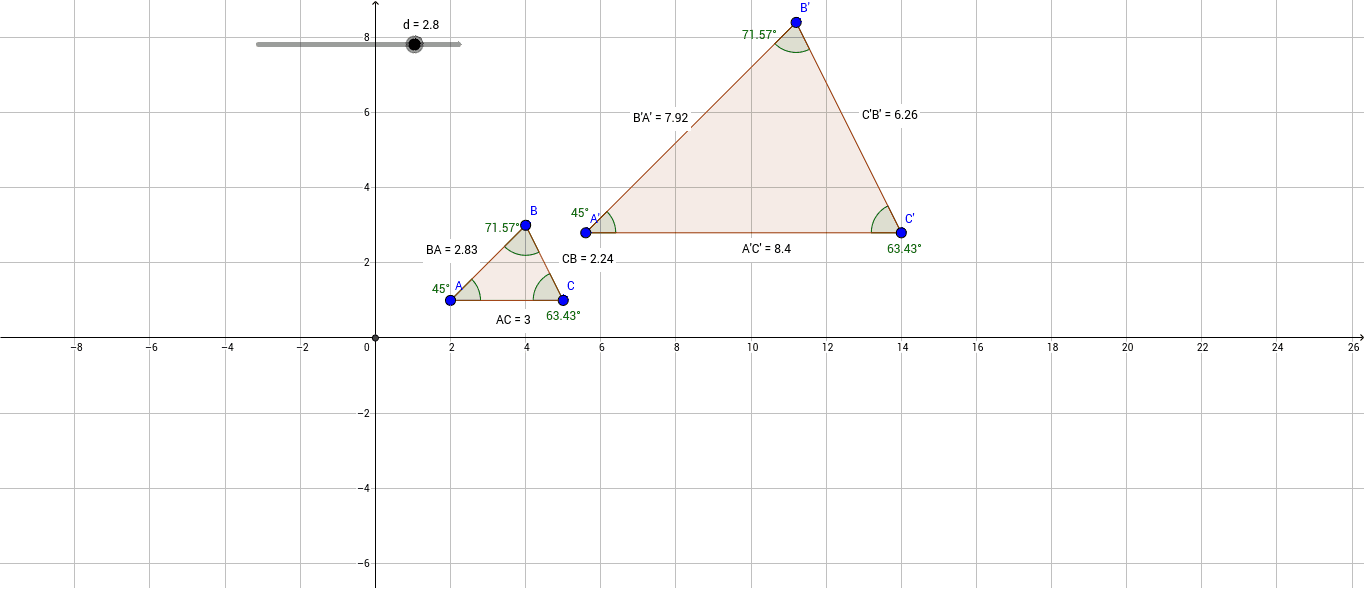
This example demonstrates the dilation of similar figures, specifically showing how a triangle remains similar after being dilated from a center point. Key math concepts include dilation transformation, similar figures, and the relationships between side lengths and angles of triangles. The construction uses GeoGebra commands and objects like Polygon, Angle, Intersect, Dilate, Distance, and Midpoint to build the figures, measure distances and angles, and visualize the dilation effect. Suitable for high school students learning about geometric transformations and similar figures.
GeoGebra Commands & Parameters
Polygon(A, B, C) → poly1, c, a, bAngle(C, A, B) → αAngle(A, B, C) → βAngle(B, C, A) → γIntersect(xAxis, yAxis) → DDilate(A, d, D) → A'Dilate(B, d, D) → B'Dilate(C, d, D) → C'Polygon(A', B', C') → poly1', c', a', b'Angle(C', A', B') → δAngle(A', B', C') → εAngle(B', C', A') → ζDistance(A, C) → distanceACMidpoint(A, C) →Distance(C, B) → distanceCBMidpoint(C, B) →Distance(B, A) → distanceBAMidpoint(B, A) →Distance(A', C') → distanceA'C'Midpoint(A', C') →Distance(C', B') → distanceC'B'Midpoint(C', B') →Distance(B', A') → distanceB'A'Midpoint(B', A') →