
Dilation Introduction
Loading the math board and drawing, please wait…
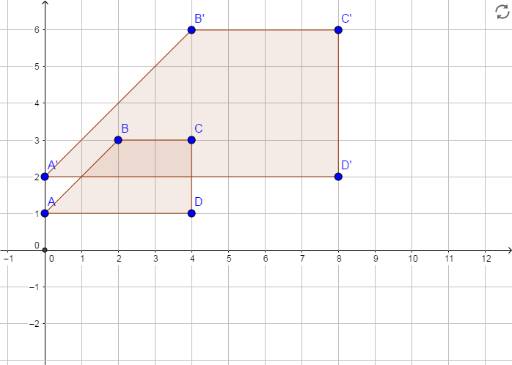
This example demonstrates the concept of dilation, showing the application of complex numbers in geometric transformations through equilateral triangles. It uses commands like Point, Polygon, Intersect, and Dilate to construct the figure. Suitable for high school mathematics, particularly in the areas of geometric transformations and complex numbers.
GeoGebra Commands & Parameters
Point(yAxis) → APolygon(A, B, C, D) → poly1, a, b, c, dIntersect(xAxis, yAxis) → EDilate(A, 2, E) → A'Dilate(B, 2, E) → B'Dilate(C, 2, E) → C'Dilate(D, 2, E) → D'Polygon(A', B', C', D') → poly1', a', b', c', d'
AI Drawing Prompt Reference
Draw a figure demonstrating the concept of dilation, featuring an equilateral triangle and the intersection point of the coordinate axes. Scale each vertex of the triangle by a factor of two from this intersection point and plot the new points, then connect these points to form a new equilateral triangle, clearly showing the effect of the dilation transformation.
The prompt above was compiled from the original drawing commands and is for reference only.