
Digital Algebra Tiles Exploration
Loading the math board and drawing, please wait…
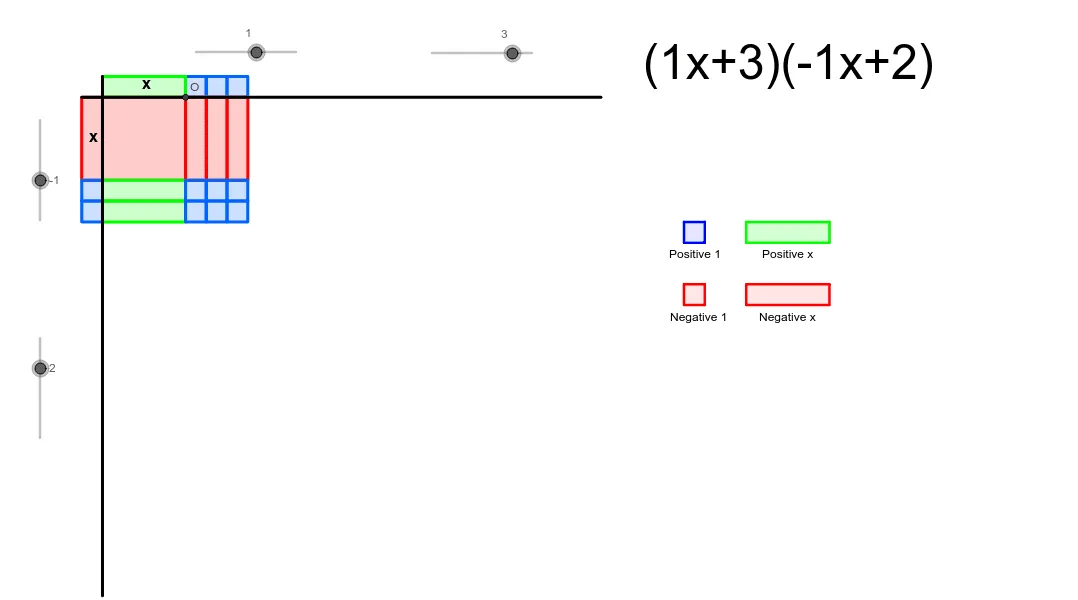
This is a tool for students to explore patterns in products of binomials. It involves polynomial concepts and uses GeoGebra commands such as Intersect, Point, Polygon, etc., for geometric construction. Suitable for middle school and above students.
GeoGebra Commands & Parameters
Intersect(xAxis, yAxis) → APoint(xAxis) → BPoint(yAxis) → DPolygon(A, B, C, D) → poly1, a, b, c, dPoint(yAxis) → EVector(E, F) → uTranslate(A, u) → A'Translate(B, u) → B'Translate(C, u) → C'Translate(D, u) → D'Polygon(A', B', C', D') → poly1', a', b', c', d'Translate(A', u) → A''Translate(B', u) → B''Translate(C', u) → C''Translate(D', u) → D''Polygon(A'', B'', C'', D'') → poly1'', a'', b'', c'', d''Translate(A'', u) → A'''Translate(B'', u) → B'''Translate(C'', u) → C'''Translate(D'', u) → D'''Polygon(A''', B''', C''', D''') → poly1''', a''', b''', c''', d'''Translate(A''', v) → GTranslate(B''', v) → HTranslate(C''', v) → ITranslate(D''', v) → JTranslate(A''', u) → KTranslate(B''', u) → LTranslate(C''', u) → MTranslate(D''', u) → NPolygon(K, L, M, N) → poly2, k, l, m, nSequence(Polygon[(0, -i), (-1, -i), (-1, -i + 4), (0, -i + 4)], i, 4, 4 * num2, 4) → list2Sequence(Polygon[(0, -4 * num2 - j), (0, -4 * num2 - (j - 1)), 4], j, 1, con2, 1) → list3Sequence(Polygon[(4 * num + j - 1, 0), (4 * num + j, 0), 4], j, 1, con1, 1) → list4Sequence(Sequence[Polygon[(4 * (n - 1), -4 * m), (4 * n, -4 * m), 4], m, 1, num2], n, 1, num) → list1Segment(P, Q) → eSegment(R, S) → fSequence(Sequence[Polygon[(4 * i, -4 * num2 - j), (4 * i, -4 * num2 - j + 1), (4 * (i - 1), -4 * num2 - j + 1), (4 * (i - 1), -4 * num2 - j)], j, 1, con2], i, 1, num) → list6Sequence(Sequence[Polygon[(4 * num + j - 1, -4 * (i - 1)), (4 * num + j, -4 * (i - 1)), (4 * num + j, -4 * i), (4 * num + j - 1, -4 * i)], j, 1, con1], i, 1, num2) → list7Sequence(Sequence[Polygon[(4 * num + j - 1, -4 * num2 - i), (4 * num + j, -4 * num2 - i), 4], j, 1, con1], i, 1, con2) → list5Polygon(T, U, V, W) → poly3, t, u_1, v_1, wPolygon(Z, A_1, B_1, C_1) → poly4, z, a_1, b_1, c_1Polygon(D_1, E_1, F_1, G_1) → poly5, d_1, e_1, f_1, g_1Polygon(H_1, I_1, J_1, K_1) → poly6, h_1, i_1, j_1, k_1
AI Drawing Prompt Reference
Start at the origin and construct a rectangle defined by four points, then translate it vertically three times to create a stack of four aligned rectangles. From this base, replicate the rectangles horizontally and vertically to form a regular grid array. Above the grid and to its right, add strips composed of small squares to represent algebraic area terms. Finally, draw several separate rectangles around the perimeter and include connecting segments to show relationships between parts. The overall layout should clearly illustrate the geometric pattern of binomial products.
The prompt above was compiled from the original drawing commands and is for reference only.