
Diagonals of Parallelograms Bisect Each Other
Loading the math board and drawing, please wait…
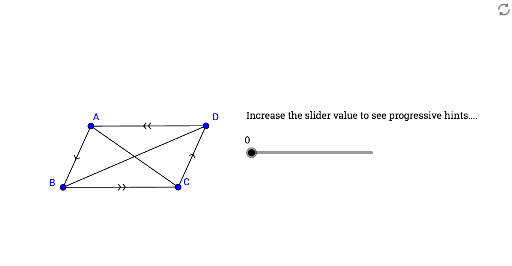
This GeoGebra example dynamically demonstrates the key property that the diagonals of a parallelogram bisect each other. The core mathematical concept is the diagonal property of parallelograms: the intersection point of the diagonals is the midpoint of each diagonal, reflecting central symmetry. The construction uses commands such as Polygon to create the parallelogram, Midpoint to locate the intersection, Rotate and Line to build auxiliary elements, Segment to connect points, and Intersect to mark the diagonal crossing. Angle and Segment tools measure angles and side lengths, while text objects display the conclusion. Suitable for middle school geometry, this interactive applet helps students visualize and verify the property by dragging vertices, reinforcing geometric reasoning and the concept of midpoint in quadrilaterals.
GeoGebra Commands & Parameters
Polygon(A, B, C) → poly1, c, a, bMidpoint(A, C) → MRotate(A, 180°, M) → A'Rotate(B, 180°, M) → B'Rotate(C, 180°, M) → C'Polygon(A', B', C') → poly1', c', a', b'Line(A, B') → fLine(B, C) → gLine(A, C) → hAngle(A, C, B) → αAngle(C, A, B') → βSegment(B, B') → mIntersect(b, b') → EIntersect(b, b') → FPolygon(A, M, B') → poly2, b'_1, a_1, m_1Polygon(C, M, B) → poly3, b_1, c_1, m_2Angle(B', M, A) → γAngle(B, M, C) → δSegment(A, B') → iSegment(B, C) → j