
Determining Volume by Decomposition
Loading the math board and drawing, please wait…
In collections
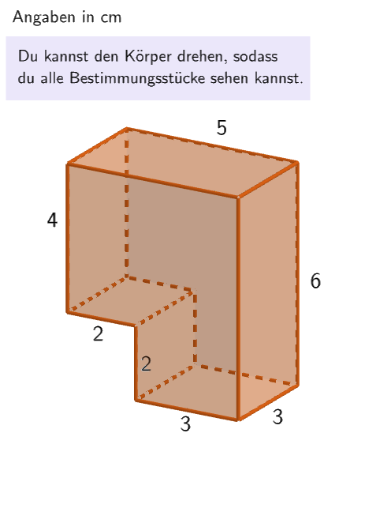
Rauminhalt zusammengesetzter Körper - Quader und Würfel
This example demonstrates how to calculate the volume of a three-dimensional shape by decomposing it. Key mathematical concepts include volume computation, geometric transformations, and spatial geometry. Construction involves GeoGebra commands such as Translate, If, Element, and others. Suitable for middle school geometry studies or mathematical modeling exercises.
GeoGebra Commands & Parameters
Translate({Prism[Polygon[(-0.5, 1.5, -1), (-0.5, 1.5, -1) + (3, 0), (-0.5, 1.5, -1) + (3, -3), (-0.5, 1.5, -1) + (0, -3)], (-0.5, 1.5, 5)]}, Vector[(dx / 2 + 0.001, 0, 0)]) → object122HintSenkrecht1Translate({Prism[Polygon[(-0.5, 1.5), (-0.5, 1.5) + (3, 0), (-0.5, 1.5) + (3, 0, 2), (-0.5, 1.5) + (0, 0, 2)], (-0.5, -1.5)]}, Vector[(0, 0, ((-dz)) / 2 - 1)]) → object122HintWaagrecht1Translate({Prism[Polygon[(-2.5, 1.5, 1), (-2.5, 1.5, 1) + (5, 0), (-2.5, 1.5, 1) + (5, 0, 4), (-2.5, 1.5, 1) + (0, 0, 4)], (-2.5, -1.5, 1)]}, Vector[(dx, 0, dz / 2 + 0.001)]) → object122HintWaagrecht2Translate({Prism[Polygon[(-0.5, 1.5, 1), (-0.5, 1.5, 1) + (0, -3), (-0.5, 1.5, 1) + (-2, -3), (-0.5, 1.5, 1) + (-2, 0)], (-0.5, 1.5, 5)]}, Vector[(((-dx)) / 2, 0, 0)]) → object122HintSenkrecht2If(SelectedIndex[l1] ≟ 2, Volume[object122HintWaagrecht1(1)], Volume[object122HintSenkrecht1(1)]) → sol2If(SelectedIndex[l1] ≟ 2, Volume[object122HintWaagrecht2(1)], Volume[object122HintSenkrecht2(1)]) → sol1Element(randomQuestions, Mod[questionCount, Length[randomQuestions]] + 1) → randomQuestionElement(allQuestions, randomQuestion) → actualQuestionShuffle(Sequence[Element[actualQuestion, i], i, 2, numberOfAnswers + 1]) → actualAnswersShuffled, {?, ?, ?, ?, ?, ?}Element(actualAnswersShuffled, 3) → actualAnswer03Element(actualAnswersShuffled, 2) → actualAnswer02Element(actualAnswersShuffled, 1) → actualAnswer01Element(actualAnswersShuffled, 4) → actualAnswer04Element(actualAnswersShuffled, 5) → actualAnswer05Element(actualAnswersShuffled, 6) → actualAnswer06Element(actualAnswer06, 2) → chk06ExpectedElement(actualAnswer05, 2) → chk05ExpectedElement(actualAnswer04, 2) → chk04ExpectedElement(actualAnswer01, 2) → chk01ExpectedElement(actualAnswer02, 2) → chk02ExpectedElement(actualAnswer03, 2) → chk03ExpectedCone((0, 0, 2), (0, 0, 5), 1) → figur022kegel, figur012kegel_{2}, figur012kegel_{3}Cone(((-2.7755575615628914E-17), 0, 1), ((-2.7755575615628914E-17), 0, -3), 1.5) → figur031kegel, figur021kegel_{2}, figur021kegel_{3}Cone((0, 0, 1), (0, 0, 4), 2.5) → figur042kegel, figur032kegel_{2}, figur032kegel_{3}Cone((0, 0, 1), (0, 0, 5), 1.5) → figur062kegel, figur062kegel_{2}, figur062kegel_{3}Textfield(input1) → InputBox1LaTeX(randomQuestion, true, true) → text1Remove(l1, {SelectedElement[l1]}) → l2Textfield(input2) → InputBox2LaTeX(page, true, true) → text5Sum({attemptCountInputBox1, attemptCountInputBox2}) → attemptCountTextfield(input3) → InputBox3If(page ≟ 2, page2CheckboxChanged, page ≟ 7, SelectedIndex[l2] ≠ 1, true, page ≟ 3, dz ≥ 2 ∨ dx ≥ 2, page ≟ 4, correct, page ≟ 5, dz ≟ 0 ∧ dx ≟ 0, page ≟ 6, correctInputBox3) → fixedCornerThreeD(-1, 11) → viewActualSelectedIndex(l1Page8) → selectedIndexPage8SelectedIndex(l1) → a
AI Drawing Prompt Reference
Visualize a 3D shape decomposition volume calculation example, combining multiple prisms and cones through translation transformations to form a large volume, with labeled volume formulas and key steps, demonstrating geometric transformations and spatial geometry relationships, suitable for educational purposes.
The prompt above was compiled from the original drawing commands and is for reference only.