
Determine a Line with Two Points
Loading the math board and drawing, please wait…
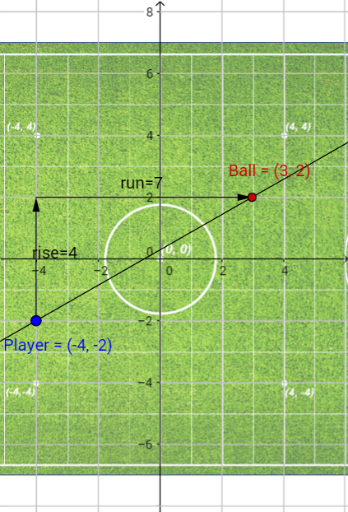
This example demonstrates how to determine a line using two points. Key mathematical concepts include linear equations and coordinate geometry. Using GeoGebra commands such as Line, Intersect, Vector, and Segment, the construction of the line and its properties are explored. Suitable for students at the junior high school level and above to learn about linear equations and coordinate geometry.
GeoGebra Commands & Parameters
Line(Player, Ball) → fLine(Player, yAxis) → gLine(Ball, xAxis) → hIntersect(g, h) → AVector(Player, A) → riseVector(A, Ball) → runSegment(Player, Ball) → distance
AI Drawing Prompt Reference
Draw a line through the player and the ball, then draw a line through the ball and the y-axis, and another line through the ball and the x-axis. Find the intersection of these two lines, calculate the vector from the player to the intersection (rise) and the vector from the intersection to the ball (run), and finally draw a segment connecting the player and the ball.
The prompt above was compiled from the original drawing commands and is for reference only.