
Describe the Effect of Geometric Transformations
Loading the math board and drawing, please wait…
In collections
Dilations
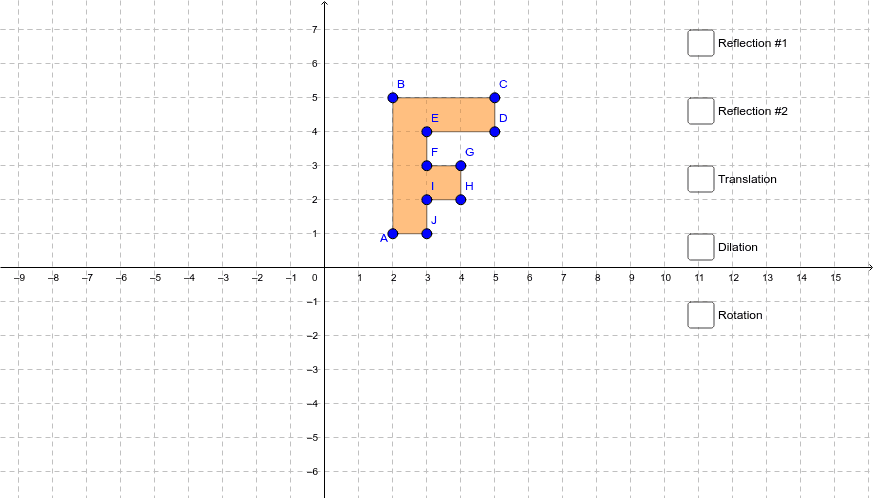
This example demonstrates how to describe the effect of geometric transformations like dilation, reflection, rotation, and translation on two-dimensional figures using coordinates. It involves core math concepts including geometric transformations and coordinate geometry. The construction uses GeoGebra commands and objects such as Vector, Point, OrthogonalLine, Polygon, Mirror, Dilate, Rotate, Translate. Suitable for middle school and above students to learn and explore the properties of geometric transformations and their coordinate representations, ideal for classroom demonstrations and exploratory activities.
GeoGebra Commands & Parameters
Vector(K, L) → uPoint(yAxis) → MOrthogonalLine(M, yAxis) → kPoint(xAxis) → NOrthogonalLine(N, xAxis) → lPolygon(A, B, C, D, E, F, G, H, I, J) → poly1, a, j, b, c, d, e, f, g, h, iMirror(A, l) → A'Mirror(B, l) → B'Mirror(C, l) → C'Mirror(D, l) → D'Mirror(E, l) → E'Mirror(F, l) → F'Mirror(G, l) → G'Mirror(H, l) → H'Mirror(I, l) → I'Mirror(J, l) → J'Polygon(A', B', C', D', E', F', G', H', I', J') → poly1', a', j', b', c', d', e', f', g', h', i'Mirror(A, k) → A'_1Mirror(B, k) → B'_1Mirror(C, k) → C'_1Mirror(D, k) → D'_1Mirror(E, k) → E'_1Mirror(F, k) → F'_1Mirror(G, k) → G'_1Mirror(H, k) → H'_1Mirror(I, k) → I'_1Mirror(J, k) → J'_1Polygon(A'_1, B'_1, C'_1, D'_1, E'_1, F'_1, G'_1, H'_1, I'_1, J'_1) → poly1'_1, a'_1, j'_1, b'_1, c'_1, d'_1, e'_1, f'_1, g'_1, h'_1, i'_1Dilate(A, dilate, O) → A'_2Dilate(B, dilate, O) → B'_2Dilate(C, dilate, O) → C'_2Dilate(D, dilate, O) → D'_2Dilate(E, dilate, O) → E'_2Dilate(F, dilate, O) → F'_2Dilate(G, dilate, O) → G'_2Dilate(H, dilate, O) → H'_2Dilate(I, dilate, O) → I'_2Dilate(J, dilate, O) → J'_2Polygon(A'_2, B'_2, C'_2, D'_2, E'_2, F'_2, G'_2, H'_2, I'_2, J'_2) → poly1'_2, a'_2, j'_2, b'_2, c'_2, d'_2, e'_2, f'_2, g'_2, h'_2, i'_2Rotate(A, rotate, O) → A'_3Rotate(B, rotate, O) → B'_3Rotate(C, rotate, O) → C'_3Rotate(D, rotate, O) → D'_3Rotate(E, rotate, O) → E'_3Rotate(F, rotate, O) → F'_3Rotate(G, rotate, O) → G'_3Rotate(H, rotate, O) → H'_3Rotate(I, rotate, O) → I'_3Rotate(J, rotate, O) → J'_3Polygon(A'_3, B'_3, C'_3, D'_3, E'_3, F'_3, G'_3, H'_3, I'_3, J'_3) → poly1'_3, a'_3, j'_3, b'_3, c'_3, d'_3, e'_3, f'_3, g'_3, h'_3, i'_3Translate(A, u) → A'_4Translate(B, u) → B'_4Translate(C, u) → C'_4Translate(D, u) → D'_4Translate(E, u) → E'_4Translate(F, u) → F'_4Translate(G, u) → G'_4Translate(H, u) → H'_4Translate(I, u) → I'_4Translate(J, u) → J'_4Polygon(A'_4, B'_4, C'_4, D'_4, E'_4, F'_4, G'_4, H'_4, I'_4, J'_4) → poly1'_4, a'_4, j'_4, b'_4, c'_4, d'_4, e'_4, f'_4, g'_4, h'_4, i'_4
AI Drawing Prompt Reference
Draw a decagon and apply transformations including reflection, dilation, and rotation. First, reflect the decagon over the x-axis to get a new decagon. Then, reflect it over the y-axis to get another new decagon. Next, dilate the decagon with a scale factor around point O. Finally, rotate the decagon around point O by a certain angle.
The prompt above was compiled from the original drawing commands and is for reference only.