
Derivation and Visualization of Ellipse Area Formula
Loading the math board and drawing, please wait…
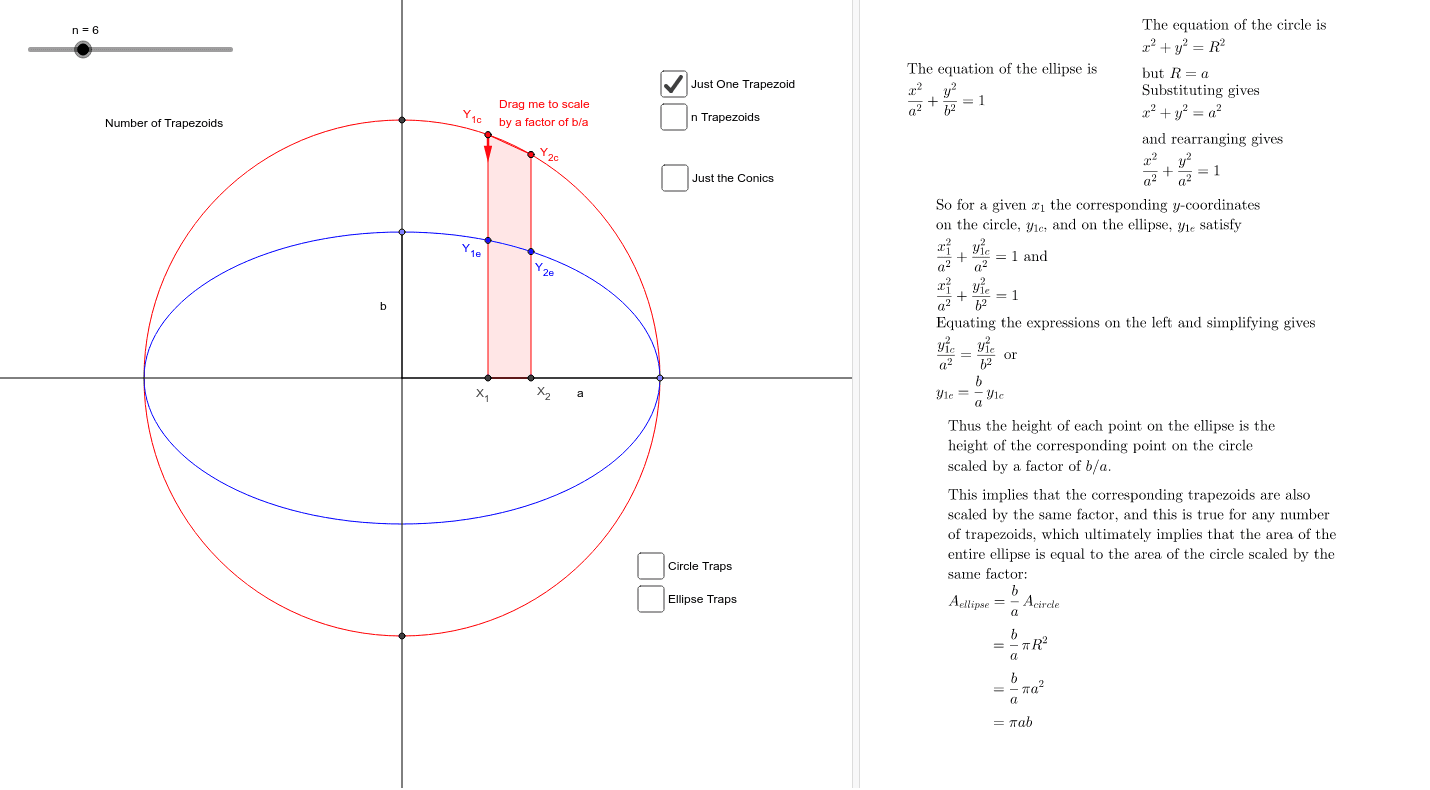
This example demonstrates the derivation of the ellipse area formula and visualizes it using GeoGebra. Key mathematical concepts include the properties of ellipses and area calculation. Commands used include Segment, Point, Mirror, Circle, OrthogonalLine, Intersect, Ray, Ellipse, Sequence, Polygon, PathParameter, Append, Vector, Conic, etc. Suitable for high school mathematics education and learning.
GeoGebra Commands & Parameters
Segment(O, Z) → aPoint(a) → AMirror(A, O) → A'Circle(O, Distance[O, A]) → cOrthogonalLine(O, a) → bIntersect(c, b, 2) → DIntersect(c, b, 1) → EPoint(b) → BRay(O, A') → dCircle(B, Segment[O, A]) → eIntersect(e, a, 1) → F_1Intersect(e, d, 1) → F_2Ellipse(F_2, F_1, B) → fSequence(((i * x(A) / n), 0), i, 0, n) → x_{i}Sequence(OrthogonalLine[Element[x_{i}, i], a], i, 1, n) → lines_{vert}Sequence(Intersect[f, Element[lines_{vert}, i], 2], i, 1, n) → y_{ellip}Sequence(Intersect[c, Element[lines_{vert}, i], 2], i, 1, n) → y_{circ}Sequence(Polygon[{Element[x_{i}, 1 + j], Element[y_{ellip}, 1 + j], Element[y_{ellip}, 2 + j], Element[x_{i}, 2 + j]}], j, 0, n - 2) → traps_{low}Polygon(Element[x_{i}, n], Element[y_{ellip}, n], A) → poly1, g, h, iPolygon(Element[x_{i}, n], Element[y_{circ}, n], A) → poly2, a_1, j, kSequence(Polygon[{Element[x_{i}, 1 + j], Element[y_{circ}, 1 + j], Element[y_{circ}, 2 + j], Element[x_{i}, 2 + j]}], j, 0, n - 2) → traps_{high}OrthogonalLine(X_1, a) → pOrthogonalLine(X_2, a) → qIntersect(f, p, 2) → Y_{1e}Intersect(c, p, 2) → Y_{1c}Intersect(f, q, 2) → Y_{2e}Intersect(c, q, 2) → Y_{2c}Polygon(X_1, Y_{1e}, Y_{2e}, X_2) → poly3, x_1, c_1, g_1, x_2Polygon(X_1, Y_{1c}, Y_{2c}, X_2) → poly4, x_3, f_1, h_1, x_4Segment(Y_{1e}, Y_{1c}) → rSegment(Y_{2e}, Y_{2c}) → sPoint(r) → IPoint(s, PathParameter[I]) → JPolygon(X_1, I, J, X_2) → poly5, x_5, i_1, j_1, x_6PathParameter(I) → oSequence(Segment[Element[y_{ellip}, i], Element[y_{circ}, i]], i, 1, n) → segsSequence(Point[Element[segs, i], o], i, 1, n) → y_{slide}Sequence(Segment[Element[x_{i}, j], Element[y_{slide}, j]], j, 1, n) → big_{segs}Append(Append[y_{slide}, A], O) → list1Polygon(list1) → poly6Vector(I, (x(I), y(I) - (0.25 * (x(A) - y(B))))) → vVector(I, (x(I), y(I) + (0.25 * (x(A) - y(B))))) → wSegment(O, A) → b_1Segment(O, B) → d_1Conic(Element[y_{slide}, 1], A, A', (-Element[y_{slide}, 1]), Element[y_{slide}, 2]) → e_1
AI Drawing Prompt Reference
Draw an ellipse to illustrate the derivation of its area formula. First, draw the major and minor axes of the ellipse, then draw a circle with the major axis as its diameter. Mark a series of points on both the ellipse and the circle, and connect these points to form small trapezoids. The sum of the areas of these trapezoids approximates the area of the ellipse. Additionally, show some auxiliary lines and shapes inside and outside the ellipse to help understand the derivation of the area formula.
The prompt above was compiled from the original drawing commands and is for reference only.