
Demonstration of Upper and Lower Sums/Riemann Sum by Martin Flashman
Loading the math board and drawing, please wait…
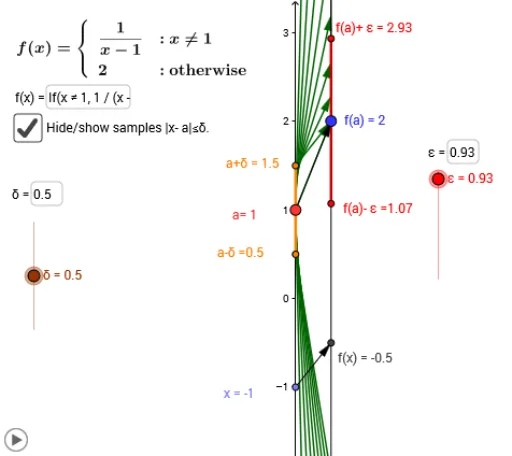
This example demonstrates how to calculate the upper sum, lower sum, and Riemann sum of a function by constructing rectangles. It involves core mathematical concepts such as upper and lower sums, Riemann sum, similar triangles, correlation, rectangles, and incircle. The construction uses GeoGebra commands/objects like Point, Vector, Textfield, Segment, Line, Derivative, Intersect, Polygon, Sequence. Suitable for high school calculus students to understand the geometric meaning of Riemann integration.
GeoGebra Commands & Parameters
Point(yAxis) → AVector(A, B) → f_2Textfield(f) → inputBox1Vector(x_1, y_1) → vSegment(f_a, F) → cSegment(E, F) → dSegment(A, x_1) → eSegment(B, y_1) → gSegment(B, y_1) → hLine(x_1, y_1) → iTextfield(f) → inputBox2Derivative(f) → qSegment(C, D) → bSegment((0, y(A) - δ), (0, y(A) + δ)) → mPoint(m) → GPoint(m) → HPoint(yAxis) → IVector(I, J) → uIntersect(n, p) → KIntersect(a, p) → LIntersect(a, r) → MIntersect(n, r) → NPolygon(K, L, M, N) → poly1, k_1, l_1, m_1, n_1Textfield(ε) → inputBox3Textfield(δ) → inputBox4Textfield(f) → InputBox1Sequence(Vector[(0, xk), (2, f(xk))], xk, y(A) - δ, y(A) + δ, δ / 8) → arrowlist