
Demonstration of Two Parts of a Cube
Loading the math board and drawing, please wait…
In collections
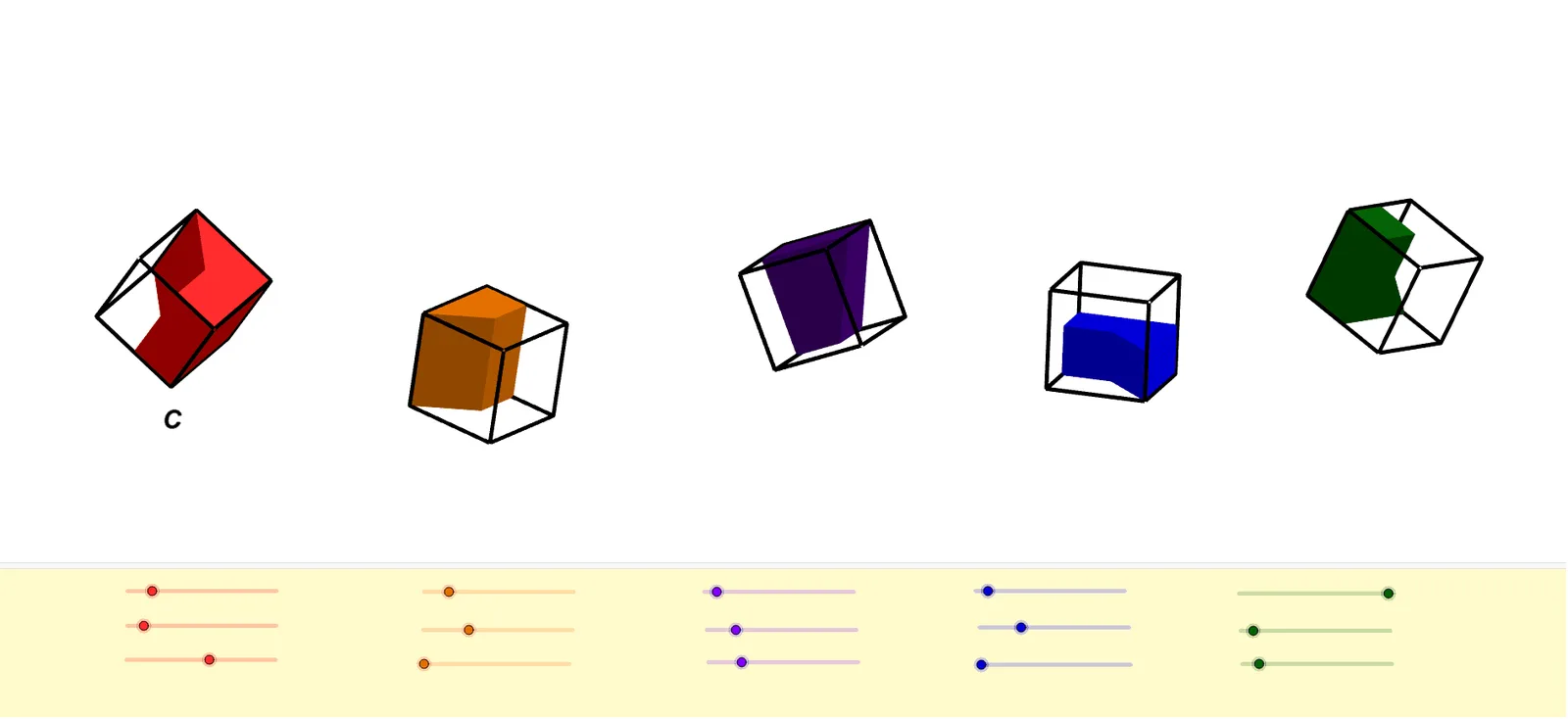
TWO PARTS OF A CUBE
This example demonstrates the different parts of a cube and their geometric relationships. It involves core mathematical concepts such as solid geometry, surface area, similar triangles, correlation, normal distribution, and hypergeometric distribution. The construction uses GeoGebra commands and objects like Point, Cube, Intersect, Line, Rotate, Midpoint, and Prism. It is suitable for high school and above students learning complex geometric structures and probability statistics applications.
GeoGebra Commands & Parameters
Point(xAxis) → APoint(xAxis) → BPoint(Circle[B, Distance[A, B], Segment[A, B]]) → CCube(A, B, C) → a, D, faceCDHG, faceEFGH, edgeAD_1, edgeAB, edgeBC, edgeCD, edgeAE, edgeDH_1, edgeEH, edgeEF, E, edgeBF, edgeFG, edgeCG, edgeGH, F, G, H, faceABCD, faceADHE, faceABFE, faceBCGFPoint(xAxis) → IPoint(xAxis) → JPoint(Circle[J, Distance[I, J], Segment[I, J]]) → KCube(I, J, K) → b, L, faceKLPO, faceMNOP, edgeIL, edgeIJ, edgeJK_1, edgeKL, edgeIM, edgeLP, edgeMP, edgeMN, M, edgeJN, edgeNO, edgeKO, edgeOP, N, O, P, faceIJKL, faceILPM, faceIJNM, faceJKONIntersect(yAxis, xAxis) → QPoint(xAxis) → RPoint(Circle[R, Distance[Q, R], Segment[Q, R]]) → SCube(Q, R, S) → c, T, faceSTZW, faceUVWZ, edgeQT, edgeQR, edgeRS_1, edgeST, edgeQU, edgeTZ, edgeUZ, edgeUV, U, edgeRV, edgeVW, edgeSW, edgeWZ, V, W, Z, faceQRST, faceQTZU, faceQRVU, faceRSWVPoint(xAxis) → A_1Point(xAxis) → B_1Point(Circle[B_1, Distance[A_1, B_1], Segment[A_1, B_1]]) → C_1Cube(A_1, B_1, C_1) → d, D_1, face5, face6, edge2, edge1, edge4, edge6, edge3, edge8, edge10, edge9, E_1, edge5, edge11, edge7, edge12, F_1, G_1, H_1, face1, face3, face2, face4Point(xAxis) → I_1Point(xAxis) → J_1Point(Circle[J_1, Distance[I_1, J_1], Segment[I_1, J_1]]) → K_1Cube(I_1, J_1, K_1) → e, L_1, face11, face12, edge14, edge13, edge16, edge18, edge15, edge20, edge22, edge21, M_1, edge17, edge23, edge19, edge24, N_1, O_1, P_1, face7, face9, face8, face10Line(A, yAxis) → fLine(I, yAxis) → gLine(A_1, yAxis) → hLine(I_1, yAxis) → iLine(A, zAxis) → jLine(I, zAxis) → kLine(A_1, zAxis) → lLine(I_1, zAxis) → mRotate(a, α, f) → a'Rotate(a', β, xAxis) → a''Rotate(a'', γ, j) → a'''Rotate(b, δ, g) → b'Rotate(b', ε, xAxis) → b''Rotate(b'', ζ, k) → b'''Rotate(c, (-η), yAxis) → c'Rotate(c', θ, xAxis) → c''Rotate(c'', ι, zAxis) → c'''Rotate(d, κ, h) → d'Rotate(d', λ, xAxis) → d''Rotate(d'', μ, l) → d'''Rotate(e, ν, i) → e'Rotate(e', ξ, xAxis) → e''Rotate(e'', ο, m) → e'''Midpoint(A, B) → Q_1Midpoint(D, C) → R_1Midpoint(F, A) → S_1Midpoint(D, G) → T_1Midpoint(E, F) → U_1Prism(D, R_1, Q_1, A, H) → n, V_1, edge27, edge30, edge25, edgeAD, edgeDH, edge32, edge31, edge26, edge28, edge33, W_1, edge34, edge29, Z_1, face14, face16, face18, face15, face13, face17Prism(W_1, F, S_1, V_1) → o, A_2, edge38, edge40, edge37, edge39, edge41, edge43, edge42, B_2, face19, face22, face21, face23, face20, edge36, edge35Rotate(n, α, f) → n'Rotate(n', β, xAxis) → n''Rotate(n'', γ, j) → n'''Rotate(o, α, f) → o'Rotate(o', β, xAxis) → o''Rotate(o'', γ, j) → o'''Midpoint(N, J) → C_2Midpoint(O, K) → D_2Midpoint(M, N) → E_2Midpoint(P, O) → F_2Midpoint(I, J) → G_2Midpoint(L, K) → H_2Midpoint(M, I) → I_2Midpoint(I_2, C_2) → J_2Midpoint(P, L) → K_2Midpoint(K_2, D_2) → L_2Prism(G_2, J, K, H_2, J_2) → p, M_2, edge44, edgeJK, edge46, edge48, edge49, edge45, edge47, edge50, edge51, edge53, N_2, edge54, edge52, O_2, face24, face26, face25, face27, face28, face29Prism(F_2, O_2, N_2, E_2) → q, P_2, edge58, edge55, edge62, edge61, edge56, edge63, edge57, Q_2, face31, face33, face34, face32, face30, edge59, edge60Rotate(p, δ, g) → p'Rotate(p', ε, xAxis) → p''Rotate(q, δ, g) → q'Midpoint(V, R) → R_2Midpoint(R, Q) → S_2Midpoint(U, V) → T_2Midpoint(T_2, S_2) → U_2Midpoint(S, W) → V_2Midpoint(T, S) → W_2Prism(S_2, R, S, W_2, U_2) → r, Z_2, edge64, edgeRS, edge66, edge69, edge68, edge65, edge67, edge72, edge70, edge73, A_3, edge74, edge71, B_3, face35, face37, face36, face38, face39, face40Prism(Z_2, A_3, W, U_2) → s, C_3, edge75, edge78, edge82, edge77, edge79, edge83, edge80, D_3, face41, face45, face44, face43, face42, edge81, edge76Rotate(r, (-η), yAxis) → r'Rotate(r', θ, xAxis) → r''Rotate(r'', ι, zAxis) → r'''Rotate(s, (-η), yAxis) → s'Rotate(s', θ, xAxis) → s''Rotate(s'', ι, zAxis) → s'''Midpoint(A_1, B_1) → E_3Midpoint(B_1, F_1) → F_3Midpoint(E_1, A_1) → G_3Midpoint(G_3, F_3) → H_3Midpoint(D_1, A_1) → I_3Midpoint(C_1, B_1) → J_3Midpoint(J_3, I_3) → K_3Prism(A_1, I_3, J_3, B_1, G_3) → t, L_3, edge86, edge91, edge87, edge84, edge85, edge92, edge93, edge88, edge89, edge94, M_3, edge95, edge90, N_3, face46, face48, face51, face49, face47, face50Midpoint(L_3, M_3) → O_3Midpoint(F_1, G_1) → P_3Prism(O_3, P_3, M_3, H_3) → u, Q_3, edge99, edge96, edge103, edge101, edge97, edge104, edge98, R_3, face53, face55, face56, face54, face52, edge102, edge100Rotate(t, κ, h) → t'Rotate(t', λ, xAxis) → t''Rotate(t'', μ, l) → t'''Rotate(u, κ, h) → u'Rotate(u', λ, xAxis) → u''Rotate(u'', μ, l) → u'''Midpoint(P_1, O_1) → S_3Midpoint(M_1, N_1) → T_3Midpoint(L_1, K_1) → U_3Midpoint(I_1, J_1) → V_3Midpoint(P_1, M_1) → W_3Midpoint(O_1, N_1) → Z_3Midpoint(Z_3, W_3) → A_4Midpoint(L_1, I_1) → B_4Midpoint(K_1, J_1) → C_4Midpoint(C_4, B_4) → D_4Prism(L_1, B_4, D_4, U_3, P_1) → v, E_4, edge107, edge112, edge110, edge106, edge105, edge113, edge114, edge111, edge108, edge115, F_4, edge116, edge109, G_4, face59, face57, face62, face61, face58, face60Midpoint(F_4, D_4) → H_4Midpoint(G_4, U_3) → I_4Prism(U_3, K_1, I_4, D_4) → w, J_4, edge121, edge120, edge119, edge124, edge122, edge125, edge123, K_4, face63, face65, face66, face67, face64, edge117, edge118Rotate(v, ν, i) → v'Rotate(w, ν, i) → w'Rotate(v', ξ, xAxis) → v''Rotate(w', ξ, xAxis) → w''Rotate(v'', ο, m) → v'''Rotate(w'', ο, m) → w'''Point(k) → L_4Point(b''') → Q_4Point(b''') → R_4Point(b''') → S_4Point(b''') → T_4Prism(H_2, L_2, K_2, M_4, G_2) → a_1, N_4, edge129, edge131, edge132, edge130, edge126, edge134, edge133, edge135, edge127, edge136, O_4, edge137, edge128, P_4, face71, face68, face72, face73, face69, face70Rotate(a_1, δ, g) → b_1Rotate(b_1, ε, xAxis) → c_1Rotate(c_1, ζ, k) → d_1Prism(U_4, K_2, L_2, L_4) → e_1, V_4, edge141, edge143, edge140, edge142, edge144, edge146, edge145, W_4, face74, face77, face76, face78, face75, edge139, edge138Rotate(e_1, δ, g) → f_1Rotate(f_1, ε, xAxis) → g_1Rotate(g_1, ζ, k) → h_1
AI Drawing Prompt Reference
Draw two cubes, then rotate each cube around the Y-axis, X-axis, and Z-axis at different angles to show the rotated cubes. Draw three lines parallel to the X-axis, Y-axis, and Z-axis, and mark their intersection point. Finally, calculate and label the midpoints of the cube's edges to demonstrate their relationships with the cube.
The prompt above was compiled from the original drawing commands and is for reference only.