
Demonstration of Rectangular Prism Sections
Loading the math board and drawing, please wait…
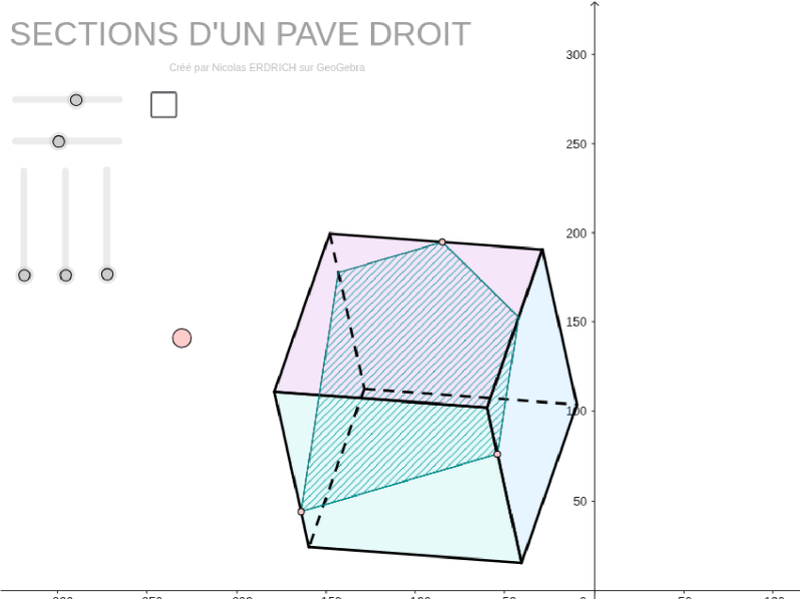
This example demonstrates the changing cross-sectional shapes of a rectangular prism at different angles. It involves core mathematical concepts such as solid geometry, vector operations, trigonometry, and 3D coordinate transformations. Construction highlights include the use of GeoGebra commands like Sequence, Element, Point, Polygon, Segment, Intersect, Line, along with objects like vectors u, v, w and rotation matrices R_x, R_y, R_z. It is suitable for high school students and math enthusiasts exploring spatial geometry and transformations.
GeoGebra Commands & Parameters
Sequence(Mat * Element[cube, k], k, 1, 8) → cube'Element(Element[AE, 3], 1) → droiteSequence(I + (Element[cube', k, 1, 1], Element[cube', k, 2, 1]), k, 1, 8) → listepointsPoint(listepoints) → CElement(AB, 3, 1) → avantElement(AC, 3, 1) → dessusPoint(listepoints) → JPoint(listepoints) → KPoint(listepoints) → LPolygon(J, K, L, C) → poly7, j_2, k_1, l_1, c_5Point(listepoints) → MPoint(listepoints) → NPolygon(J, M, N, K) → poly8, j_3, m_1, n_1, k_2Point(listepoints) → QPolygon(K, L, Q, N) → poly9, k_3, l_2, q_1, n_2Point(listepoints) → APolygon(J, C, A, M) → poly1, j, c, a_1, mPolygon(Q, A, C, L) → poly2, q, a_2, c_1, lPolygon(A, Q, N, M) → poly3, a_3, q_2, n, m_2Segment(A, M) → a'_1Segment(J, C) → j'_1Segment(K, L) → k'_3Segment(L, Q) → l'_2Segment(M, J) → m'Segment(N, K) → n'_2Segment(Q, N) → q'_1Segment(M, N) → m'_1Segment(Q, A) → q'Segment(K, J) → j'Segment(N, K) → l'Segment(C, L) → l''Segment(C, A) → l''''Segment(M, N) → k''''Segment(C, A) → k'''Point(j_3) → BPoint(l_1) → DPoint(n_1) → EIntersect(l_1, k_1) → FIntersect(c_5, l_1) → GLine(F, G) → dSegment(B, E) → eLine(D, e) → fIntersect(f, c) → HSegment(H, D) → gSegment(B, H) → hLine(E, h) → iIntersect(d, i) → OIntersect(i, k_1) → RSegment(R, D) → kSegment(E, R) → pLine(D, e) → rIntersect(r, l'_2) → SSegment(E, S) → sLine(B, s) → tIntersect(t, c_5) → TSegment(T, D) → b_1Segment(B, T) → d_1Segment(D, S) → e_1Polygon(B, E, S, D, T) → poly4, b_2, e_2, s_1, d_2, t_1Polygon(B, E, R, D, H) → poly5, b_3, e_3, r_1, d_3, h_1