
Demonstration of Orthocenter by 43640
Loading the math board and drawing, please wait…
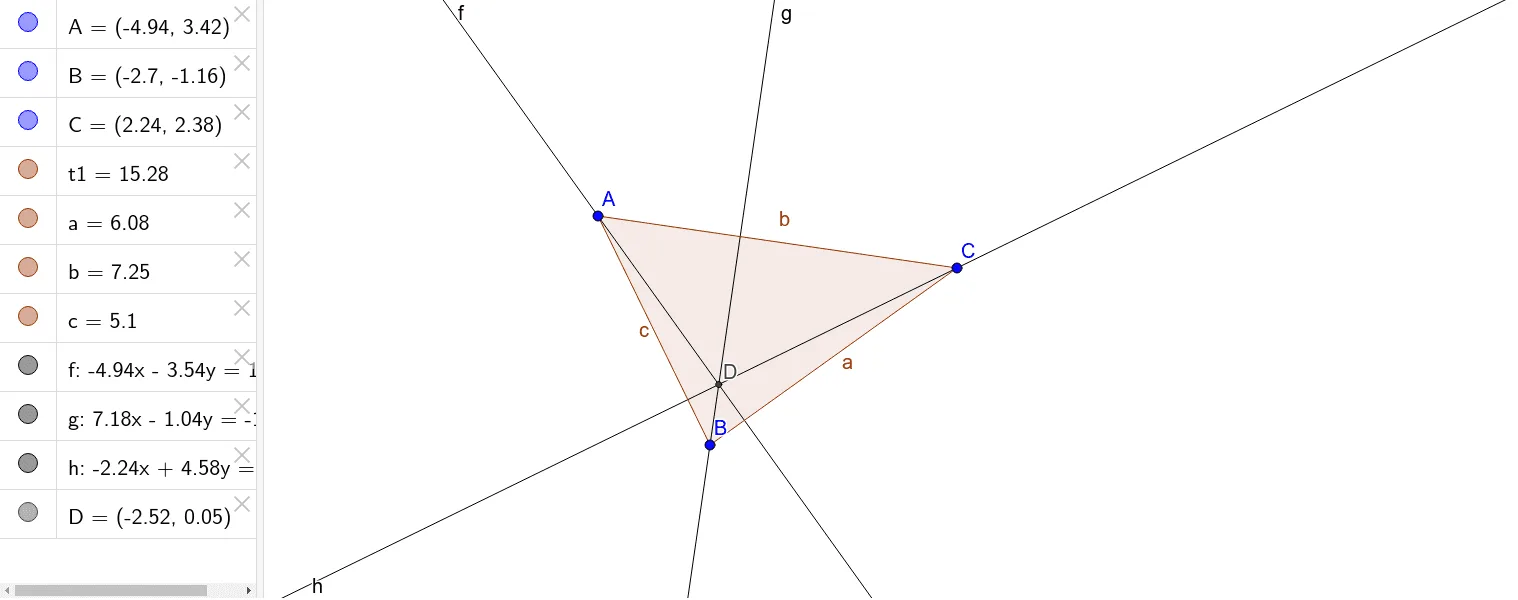
This example demonstrates the geometric properties and construction methods of the orthocenter in a triangle. It involves core mathematical concepts such as perpendicular lines, intersection points, polygon construction, and reflection. The construction uses GeoGebra commands like Polygon, OrthogonalLine, and Intersect, along with objects A, B, C, t1, c, a, b, f, g, h, D. It is suitable for high school mathematics education, providing a comprehensive understanding of concepts like orthocenter, median line, volume, tree diagrams, cubes, and reflections.
GeoGebra Commands & Parameters
Polygon(A, B, C) → t1, c, a, bOrthogonalLine(A, a) → fOrthogonalLine(B, b) → gOrthogonalLine(C, c) → hIntersect(f, g) → D
AI Drawing Prompt Reference
Draw a triangle and construct perpendicular lines from each vertex to the opposite side to locate the orthocenter. Start by drawing the triangle's sides, then draw perpendicular lines from each vertex to the corresponding opposite side, and finally find the intersection point of these three perpendiculars, marking it as the orthocenter.
The prompt above was compiled from the original drawing commands and is for reference only.