
Demonstrating Parabola Properties
Loading the math board and drawing, please wait…
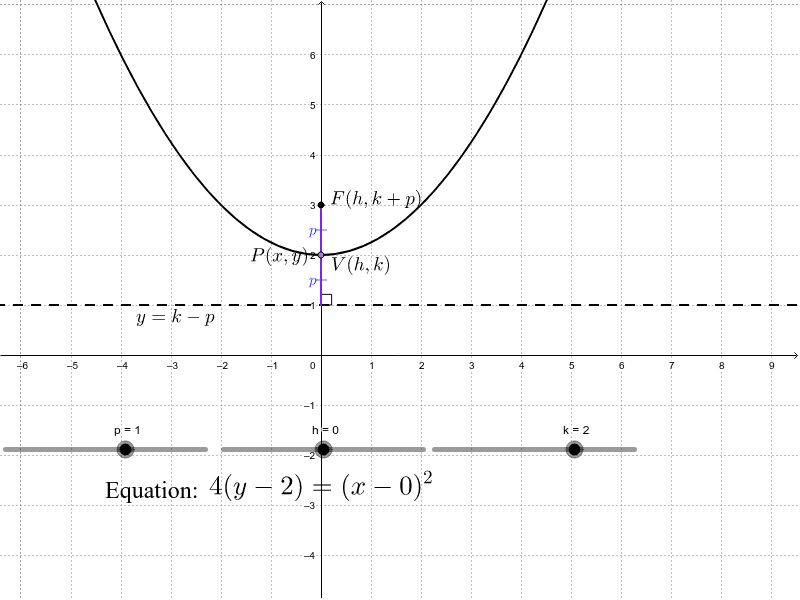
This example illustrates the geometric properties of a parabola, including its focus, directrix, and related angles. It involves core mathematical concepts such as parabola definition, focus-directrix relationship, angle calculations, and coordinate geometry transformations. Construction highlights include using GeoGebra commands like Point, Segment, Angle, and Slider to dynamically visualize the parabola and its elements. Suitable for high school students and math enthusiasts exploring parabolic characteristics and parameter effects.
GeoGebra Commands & Parameters
Point(a) → PSegment(P, F) → cSegment(Intersect[OrthogonalLine[P, b], b], P) → dAngle(d, b) → αPoint(b) → BSegment(F, V) → eSegment(V, (h, k - p)) → f
AI Drawing Prompt Reference
Draw a parabola, marking its focus and directrix, and display the angle formed by the line from the focus to any point on the parabola and the perpendicular from that point to the directrix. Use a slider to dynamically adjust parameters, showing the geometric properties and the relationship between the focus and directrix, while drawing related segments and angles, suitable for high school students to explore parabolic characteristics.
The prompt above was compiled from the original drawing commands and is for reference only.