
Cylinder Unfolding
Loading the math board and drawing, please wait…
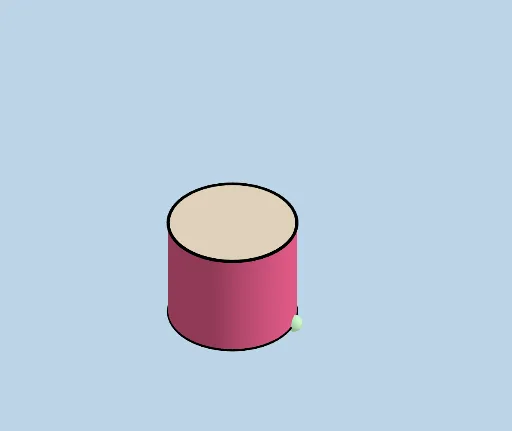
This example demonstrates the unfolding of a cylinder into a 2D net, aiding students in understanding how to calculate lateral and total surface areas. It involves core math concepts like geometry transformations, spatial visualization, and area calculations. Constructed using GeoGebra commands such as Cylinder, Line, Intersect, Plane, Rotate, Dilate, Vector, Translate, Polygon, Segment, and CircleArc. Ideal for high school students learning solid geometry and the application of dynamic geometry software.
GeoGebra Commands & Parameters
Cylinder(A, C, r) → a, c, d, bLine(D, E) → fIntersect(f, d, 1) → FSphere(F, r) → eIntersect(f, e) → G, HPlane(G, F, C) → gRotate(C, If[0 < i ≤ 1, (i * π / 2), π / 2], D, g) → C'Rotate(d, If[0 < i ≤ 1, (i * π / 2), π / 2], D, g) → d'Rotate(dd, If[0 < i ≤ 1, (i * π / 2), π / 2], D, g) → dd'Dilate(C, If[1 < i ≤ 2, 2 - i, 0], I) → C'_1Dilate(C, If[1 < i ≤ 2, 2 - i, 0], J) → C'_2Vector(C, C'_1) → uVector(C, C'_2) → vTranslate(dd, u) → dd'_1Translate(dd, v) → dd'_2Translate(K, u) → K'Translate(K, v) → K'_1Rotate(K', If[1 < i ≤ 2, ((i - 1) * π), π], C'_1) → K''Rotate(K'_1, If[1 < i ≤ 2, ((-(i - 1)) * π), (-π)], C'_2) → LTranslate(D, u) → D'Translate(D, v) → D'_1Polygon(D', D'_1, N, M) → poly1, d'_1, d'_2, n, mSegment(K'', Q) → jCircleArc(P, Q, M) → kSegment(L, S) → lCircleArc(R, N, S) → pCircleArc(C'_2, D'_1, L) → qCircleArc(C'_1, K'', D') → sPlane(T, A, B) → oRotate(C', If[2 < i ≤ 3, ((i - 2) * π / 2), π / 2], E, g) → C''Rotate(poly1, If[2 < i ≤ 3, ((i - 2) * π / 2), π / 2], E, g) → poly1'Rotate(d', If[2 < i ≤ 3, ((i - 2) * π / 2), π / 2], E, g) → d'_3Rotate(dd', If[2 < i ≤ 3, ((i - 2) * π / 2), π / 2], E, g) → dd'_3Rotate(K'', If[2 < i ≤ 3, ((i - 2) * π / 2), π / 2], E, g) → K'''Rotate(Q, If[2 < i ≤ 3, ((i - 2) * π / 2), π / 2], E, g) → Q'Segment(K''', Q') → j'Rotate(L, If[2 < i ≤ 3, ((i - 2) * π / 2), π / 2], E, g) → L'Rotate(S, If[2 < i ≤ 3, ((i - 2) * π / 2), π / 2], E, g) → S'Segment(L', S') → l'Dilate(C'', If[3 < i ≤ 4, 4 - i, 0], U) → C'''Vector(C'', C''') → wDilate(C'', If[3 < i ≤ 4, 4 - i, 0], V) → C'''_1Vector(C'', C'''_1) → tTranslate(Z, w) → Z'Translate(Z, t) → Z'_1Translate(W, w) → W'Translate(W, t) → W'_1Rotate(W', If[3 < i ≤ 4, ((-(i - 3)) * π), (-π)], C''') → W''CircleArc(C''', Z', W'') → c_1Segment(Z, Z') → f_1Rotate(W'_1, If[3 < i ≤ 4, ((i - 3) * π), π], C'''_1) → A_1CircleArc(C'''_1, Z'_1, A_1) → d_1Segment(Z, Z'_1) → g_1
AI Drawing Prompt Reference
Draw the net of a cylinder, showing its lateral surface unrolled into a rectangle and the top and bottom circular faces. Start by constructing a cylinder, then unroll its lateral surface into a rectangle while keeping the top and bottom as circles. Apply geometric transformations like rotations, translations, and dilations to the unrolled rectangle and circles to display different views of the net. The final image should include the unrolled rectangle, the circular faces, and multiple transformed parts derived from these, illustrating the composition of the cylinder's surface area.
The prompt above was compiled from the original drawing commands and is for reference only.