
Curves on a Sphere by Patrick Clément
Loading the math board and drawing, please wait…
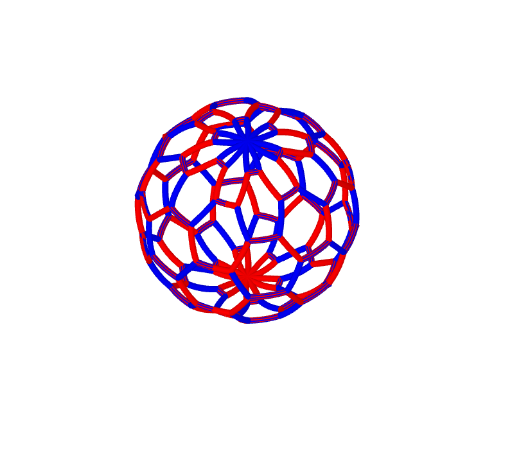
This example demonstrates how to draw curves on a sphere. It involves concepts of spherical geometry and parametric equations. Using the Function and Sequence commands, you can dynamically adjust the shape and position of the curve. Suitable for high school math education and students learning spherical geometry.
GeoGebra Commands & Parameters
Function({0, 6.283185307179586, 0, 0, 1, 1, 1, 0, 0}) → fSequence(CurveCartesian[((2 * cos(t)) * cos(i - (π / ((2 * n)) * ff((m * t))))), ((2 * sin(t)) * cos(i - (π / ((2 * n)) * ff((m * t))))), (2 * sin(i - (π / ((2 * n)) * ff((m * t))))), t, 0, 6.28319], i, -1.5708 + π / n, 1.5708, π / n) → liste1Sequence(CurveCartesian[((2 * cos(t)) * cos(i + (π / ((2 * n)) * ff((m * t) + (2 * π))))), ((2 * sin(t)) * cos(i + (π / ((2 * n)) * ff((m * t) + (2 * π))))), (2 * sin(i + (π / ((2 * n)) * ff((m * t) + (2 * π))))), t, 0, 6.28319], i, -1.5708, 1.5708 - π / n, π / n) → liste2
AI Drawing Prompt Reference
Draw a sphere with radius 2 in 3D space. On its surface, generate two families of parametric curves. The first family starts from the lower part of the sphere, with curves evenly spaced along latitude, each undulating in longitude as a sine-like wave. The second family starts from the upper part, interleaving with the first, undulating in the opposite direction. Together they form an interlaced grid pattern covering the sphere, with adjustable density and wave amplitude, creating a symmetric and dynamic geometric appearance.
The prompt above was compiled from the original drawing commands and is for reference only.