
Curvature and Frenet Trihedron for a Spiral Curve
Loading the math board and drawing, please wait…
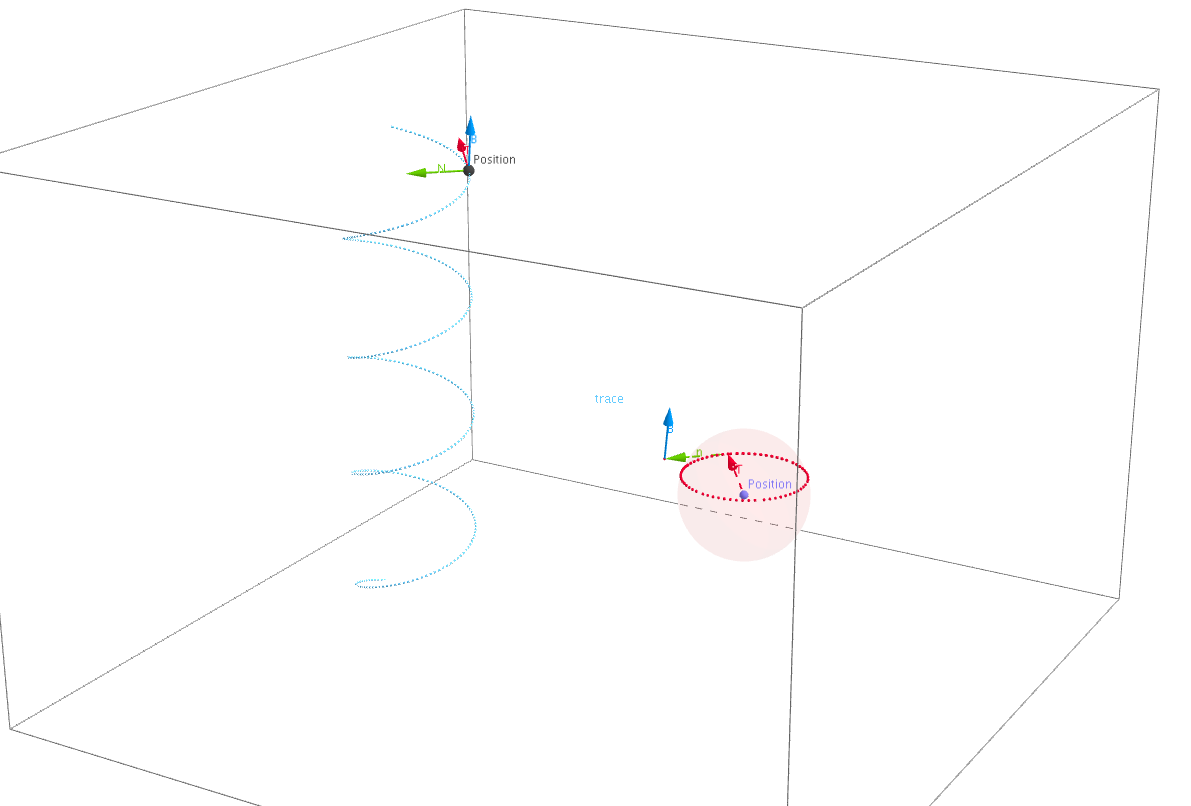
① This example demonstrates the tangent, normal, and binormal vectors at each point of a 3D spiral curve, along with the moving Frenet trihedron (frame) that changes as the point moves along the curve. ② Core mathematical concepts include curvature, torsion, Frenet-Serret formulas, moving frames, orthogonality of tangent, principal normal, and binormal vectors. ③ Construction highlights: using GeoGebra commands such as CurveCartesian to define the spiral, Intersect and Point to select a moving point on the curve, Translate and Vector to construct and translate vectors, and Sphere to add auxiliary spheres for better 3D visualization; objects include t, b, a, A, c, B, u, C, C', v, A', w, d, D, e, A'_1, f, C'', g, h, A'_2, i, C''', j, etc., to build the frame components. ④ Suitable for advanced high school or university courses in calculus and differential geometry, and for mathematical visualization demonstrations.
GeoGebra Commands & Parameters
CurveCartesian(cos((a * t)), sin((a * t)), (b * t), t, -15.707963267948966, 15.707963267948966) → cIntersect(zAxis, xAxis) → BPoint(xAxis) → CTranslate(C, u) → C'Vector(C, C') → vTranslate(A, u) → A'Vector(A, A') → wSphere(C, 1) → dIntersect(yAxis, zAxis) → DTranslate(A, e) → A'_1Vector(A, A'_1) → fTranslate(C', e) → C''Vector(C', C'') → gTranslate(A, h) → A'_2Vector(A, A'_2) → iTranslate(C'', h) → C'''Vector(C'', C''') → j
AI Drawing Prompt Reference
Draw a 3D spiral curve and show the tangent, normal, and binormal vectors at a moving point on the curve, along with the moving Frenet trihedron. First, define the spiral curve, then select point C on the x-axis as a reference point, and construct the tangent, normal, and binormal vectors through translation and vector operations. Finally, add auxiliary spheres for better 3D visualization.
The prompt above was compiled from the original drawing commands and is for reference only.