
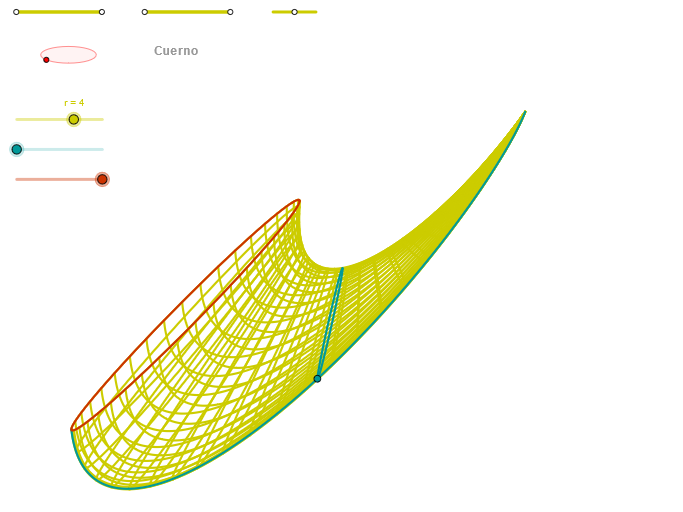
Cuerno: Conic Sections and Trigonometric Functions in 2D Geometry
Loading the math board and drawing, please wait…
In collections
geometriadinamica.es
This example demonstrates the combination of conic sections (such as ellipses) and trigonometric functions in two-dimensional geometry. Using GeoGebra commands like Segment, Point, OrthogonalLine, Circle, Intersect, Ellipse, Angle, and CurveCartesian, it constructs geometric figures and explores related phenomena. Key mathematical concepts include conic sections, trigonometric functions, vectors, and coordinate geometry. The construction involves specific commands and objects to illustrate these ideas. Suitable for high school students or college undergraduates learning applications of analytic geometry and trigonometry.
GeoGebra Commands & Parameters
Segment(Q1, Q2) → p1Point(p1) → P1Segment(P1, Q2) → p3Point(p3) → P2Segment(Q5, Q6) → p5Point(p5) → P5OrthogonalLine(C, xAxis) → zz2Circle(C, 0.62) → zz0Intersect(zz0, zz2, 1) → ZZ4Intersect(zz0, zz2, 2) → ZZ3Ellipse(ZZ3, ZZ4, 0.65) → zElipse2Point(zElipse2) → ZIntersect(zElipse2, zz2) → ZZ7, ZZ8Angle(ZZ8, C, Z) → zAngIncOrthogonalLine(C, yAxis) → zz1Intersect(zz0, zz1, 2) → ZZ2Intersect(zz0, zz1, 1) → ZZ1Ellipse(ZZ1, ZZ2, 0.65) → zElipse1Point(zElipse1) → XYIntersect(zElipse1, zz1) → ZZ5, ZZ6Angle(ZZ6, C, XY) → zAngRotSegment(Q3, Q4) → p2Point(p2) → P3Segment(P3, Q4) → p4Point(p4) → P4Segment(ZZ5, ZZ6) → zz4Segment(ZZ7, ZZ8) → zz3Intersect(zElipse2, zElipse1, 1) → zPunto1Intersect(zElipse2, zElipse1, 4) → zPunto2Segment(zPunto1, zPunto2) → zSeg2CurveCartesian(2 + (r / 1.5 * ((((a + (u * cos(α))) * sin(((b * 3.14159) * u))) * sin(zAngRot)) + ((a + (u * cos(α))) * cos(((b * 3.14159) * u))) + ((c * u) * cos(zAngRot)))), (r / 1.5 * (((((-(a + (u * cos(α)))) * sin(((b * 3.14159) * u))) * cos(zAngRot)) * sin(zAngInc)) + ((a + (u * cos(α))) * cos(((b * 3.14159) * u))) + (((c * u) * sin(zAngRot)) * sin(zAngInc)) + ((u * sin(α)) * cos(zAngInc)))) + 3, u, u1, u2) → curva2CurveCartesian(2 + (r / 1.5 * ((((a + (β * cos(v))) * sin(((b * 3.14159) * β))) * sin(zAngRot)) + ((a + (β * cos(v))) * cos(((b * 3.14159) * β))) + ((c * β) * cos(zAngRot)))), (r / 1.5 * (((((-(a + (β * cos(v)))) * sin(((b * 3.14159) * β))) * cos(zAngRot)) * sin(zAngInc)) + ((a + (β * cos(v))) * cos(((b * 3.14159) * β))) + (((c * β) * sin(zAngRot)) * sin(zAngInc)) + ((β * sin(v)) * cos(zAngInc)))) + 3, v, v1, v2) → a1CurveCartesian(2 + (r / 1.5 * ((((a + (0.5 * cos(v))) * sin(((b * 3.14159) * 0.5))) * sin(zAngRot)) + ((a + (0.5 * cos(v))) * cos(((b * 3.14159) * 0.5))) + ((c * 0.5) * cos(zAngRot)))), (r / 1.5 * (((((-(a + (0.5 * cos(v)))) * sin(((b * 3.14159) * 0.5))) * cos(zAngRot)) * sin(zAngInc)) + ((a + (0.5 * cos(v))) * cos(((b * 3.14159) * 0.5))) + (((c * 0.5) * sin(zAngRot)) * sin(zAngInc)) + ((0.5 * sin(v)) * cos(zAngInc)))) + 3, v, v1, v2) → curva1Sequence(CurveCartesian[2 + (r / 1.5 * ((((a + (u * cos(v))) * sin(((b * 3.14159) * u))) * sin(zAngRot)) + ((a + (u * cos(v))) * cos(((b * 3.14159) * u))) + ((c * u) * cos(zAngRot)))), (r / 1.5 * (((((-(a + (u * cos(v)))) * sin(((b * 3.14159) * u))) * cos(zAngRot)) * sin(zAngInc)) + ((a + (u * cos(v))) * cos(((b * 3.14159) * u))) + (((c * u) * sin(zAngRot)) * sin(zAngInc)) + ((u * sin(v)) * cos(zAngInc)))) + 3, u, u1, u2], v, v1, v2, (4 * paso)) → list1Sequence(CurveCartesian[2 + (r / 1.5 * ((((a + (u * cos(v))) * sin(((b * 3.14159) * u))) * sin(zAngRot)) + ((a + (u * cos(v))) * cos(((b * 3.14159) * u))) + ((c * u) * cos(zAngRot)))), (r / 1.5 * (((((-(a + (u * cos(v)))) * sin(((b * 3.14159) * u))) * cos(zAngRot)) * sin(zAngInc)) + ((a + (u * cos(v))) * cos(((b * 3.14159) * u))) + (((c * u) * sin(zAngRot)) * sin(zAngInc)) + ((u * sin(v)) * cos(zAngInc)))) + 3, v, v1, v2], u, u1, u2, paso) → list2
AI Drawing Prompt Reference
Construct a 2D diagram in a coordinate system using a fixed center defined by the intersections of perpendicular reference lines tied to the x- and y-axes. Build a circle with that center, and from intersections with two perpendicular directions obtain the key points that determine two ellipses sharing the same center and using the same axis scaling factor. Make the two ellipses intersect, then mark their intersection points and connect two of them with a segment. Measure the angle at the center between one reference direction and an ellipse intersection to define a rotation and an inclination relationship. Finally, draw two parameterized curves (Curve 1 and Curve 2) whose shape is controlled by the measured rotation and inclination angles, reflecting trigonometric modulation in their x- and y-coordinates, to depict the resulting trajectory-like pattern in the plane.
The prompt above was compiled from the original drawing commands and is for reference only.