
Cubes Nets
Loading the math board and drawing, please wait…
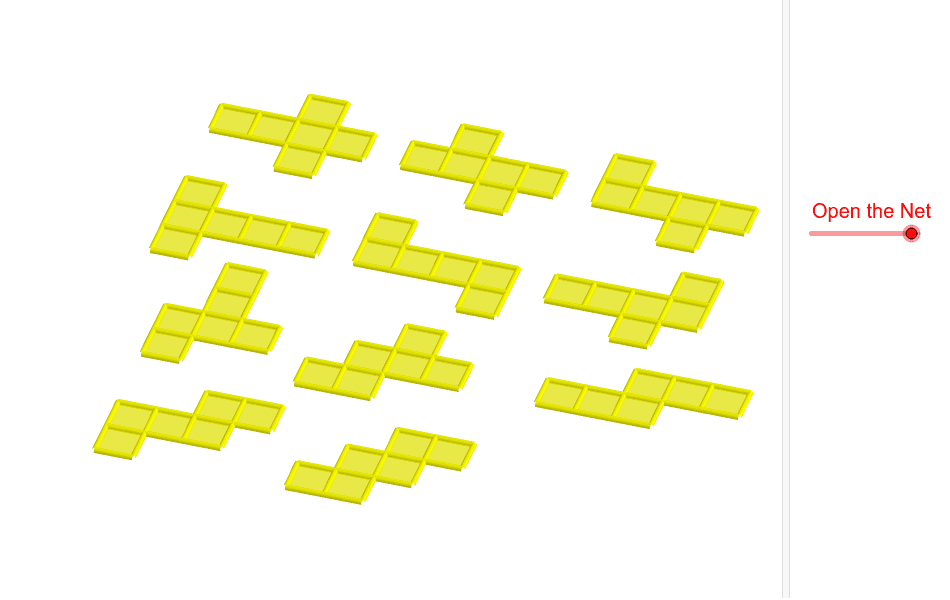
This example demonstrates the nets of cubes and their folding process. It involves core mathematical concepts like solid geometry, geometric transformations, and polygon combinations. Construction highlights include using GeoGebra commands such as Cube, Rotate, Midpoint, OrthogonalLine, Segment, and Translate to create the cube and its net faces, with transformations showing the folding effect. Suitable for high school solid geometry teaching or beginners in geometric modeling.
GeoGebra Commands & Parameters
Cube(A, B, xOyPlane) → a, C, faceBCGF, faceCDHG, faceEFGH, edgeAD, edgeAB, edgeBC, edgeCD, edgeAE, edgeDH, edgeEH, D, edgeEF, edgeBF, edgeFG, edgeCG, edgeGH, E, F, G, H, faceABCD, faceADHE, faceABFERotate(faceABFE, (90° * t), edgeAB) → faceABFE'Midpoint(A, C) → IOrthogonalLine(I, xOyPlane) → bRotate(faceABFE', 90°, b) → faceABFE''Rotate(faceABFE', 180°, b) → faceABFE''_1Rotate(faceABFE', 270°, b) → faceABFE''_2Rotate(E, (90° * t), edgeAB) → E'Rotate(F, (90° * t), edgeAB) → F'Segment(E', F') → cRotate(Rotate[faceEFGH, (90° * t), edgeAB], (90° * t), Segment[E', F']) → poly1Translate(J, Vector[A, B]) → KTranslate(faceABFE''_1, Vector[A, J]) → poly2Translate(faceABCD, Vector[A, J]) → faceABCD'Translate(faceABFE', Vector[A, J]) → faceABFE''_3Translate(poly1, Vector[A, J]) → poly1'Translate(Rotate[Rotate[faceADHE, (90° * t), edgeAB], (-90° * t), Segment[Rotate[E, (90° * t), edgeAB], Rotate[A, (90° * t), edgeAB]]], Vector[A, J]) → poly4Translate(faceABFE'', Vector[A, J]) → faceABFE'''Translate(faceABCD, Vector[A, L]) → faceABCD'_1Translate(faceABFE''_1, Vector[A, L]) → poly3Translate(faceABFE', Vector[A, L]) → faceABFE''_4Translate(poly1, Vector[A, L]) → poly1'_1Translate(faceABFE'', Vector[A, L]) → faceABFE'''_1Midpoint(B, E') → MOrthogonalLine(M, faceABFE') → dTranslate(Rotate[faceABFE'', 180°, d], Vector[A, L]) → poly5Translate(faceABCD, Vector[A, O]) → faceABCD'_2Translate(faceABFE''_1, Vector[A, O]) → poly6Translate(faceABFE', Vector[A, O]) → faceABFE''_5Translate(poly1, Vector[A, O]) → poly1'_2Translate(faceABFE'', Vector[A, O]) → faceABFE'''_2Translate(Rotate[Rotate[faceADHE, (90° * t), edgeCD], (90° * t), Segment[Rotate[H, (90° * t), edgeCD], Rotate[D, (90° * t), edgeCD]]], Vector[A, O]) → poly8Translate(faceABCD, Vector[A, N]) → faceABCD'_3Translate(faceABFE''_1, Vector[A, N]) → poly7Translate(faceABFE', Vector[A, N]) → faceABFE''_6Translate(poly1, Vector[A, N]) → poly1'_3Translate(Rotate[faceABFE'', 180°, d], Vector[A, N]) → poly9Rotate(Rotate[H, (90° * t), edgeAB], (90° * t), Segment[E', F']) → PMidpoint(P, F') → QOrthogonalLine(Q, poly1) → eTranslate(Rotate[Rotate[faceABFE'', 180°, d], 180°, e], Vector[A, N]) → poly10Translate(faceABCD, Vector[A, R]) → faceABCD'_4Translate(faceABFE''_1, Vector[A, R]) → poly11Translate(faceABFE', Vector[A, R]) → faceABFE''_7Translate(poly1, Vector[A, R]) → poly1'_4Translate(Rotate[faceABFE'', 180°, d], Vector[A, R]) → poly12Rotate(F', 180°, b) → F''Midpoint(C, F'') → SOrthogonalLine(S, faceABFE''_1) → gTranslate(Rotate[Rotate[Rotate[faceADHE, (90° * t), edgeCD], (90° * t), Segment[Rotate[H, (90° * t), edgeCD], Rotate[D, (90° * t), edgeCD]]], 180°, g], Vector[A, R]) → poly15Translate(faceABCD, Vector[A, T]) → faceABCD'_5Translate(faceABFE''_1, Vector[A, T]) → poly13Translate(faceABFE', Vector[A, T]) → faceABFE''_8Translate(Rotate[faceABFE', 270°, b], Vector[A, T]) → poly14Translate(Rotate[poly1, -90°, b], Vector[A, T]) → poly16Translate(Rotate[Rotate[Rotate[faceADHE, (90° * t), edgeAB], (-90° * t), Segment[Rotate[E, (90° * t), edgeAB], Rotate[A, (90° * t), edgeAB]]], 180°, d], Vector[A, T]) → poly17Translate(faceABCD, Vector[A, U]) → faceABCD'_6Translate(faceABFE''_1, Vector[A, U]) → poly18Translate(faceABFE', Vector[A, U]) → faceABFE''_9Translate(Rotate[faceABFE', 270°, b], Vector[A, U]) → poly19Translate(Rotate[Rotate[Rotate[faceADHE, (90° * t), edgeAB], (-90° * t), Segment[Rotate[E, (90° * t), edgeAB], Rotate[A, (90° * t), edgeAB]]], 180°, d], Vector[A, U]) → poly20Translate(Rotate[faceABFE'', 270°, d], Vector[A, U]) → poly22Translate(faceABCD, Vector[A, V]) → faceABCD'_7Translate(faceABFE''_1, Vector[A, V]) → poly21Translate(Rotate[faceABFE, (90° * t), edgeAB], Vector[A, V]) → poly23Translate(Rotate[Rotate[faceADHE, (90° * t), edgeCD], (90° * t), Segment[Rotate[H, (90° * t), edgeCD], Rotate[D, (90° * t), edgeCD]]], Vector[A, V]) → poly24Rotate(Rotate[faceADHE, (90° * t), edgeCD], (90° * t), Segment[Rotate[H, (90° * t), edgeCD], Rotate[D, (90° * t), edgeCD]]) → poly25Rotate(Rotate[E, (90° * t), edgeCD], (90° * t), Segment[Rotate[H, (90° * t), edgeCD], Rotate[D, (90° * t), edgeCD]]) → WMidpoint(D, W) → ZOrthogonalLine(Z, poly25) → hRotate(faceABFE''_1, 90°, h) → poly26Translate(Rotate[faceABFE''_1, 90°, h], Vector[A, V]) → poly27Rotate(C, 90°, h) → C'Midpoint(W, C') → A_1OrthogonalLine(A_1, poly26) → iRotate(poly25, 180°, i) → poly25'Translate(Rotate[poly25, 180°, i], Vector[A, V]) → poly28Translate(faceABCD, Vector[A, B_1]) → faceABCD'_8Translate(faceABFE''_1, Vector[A, B_1]) → poly29Translate(faceABFE', Vector[A, B_1]) → faceABFE''_{10}Translate(Rotate[Rotate[Rotate[faceADHE, (90° * t), edgeAB], (-90° * t), Segment[Rotate[E, (90° * t), edgeAB], Rotate[A, (90° * t), edgeAB]]], 180°, d], Vector[A, B_1]) → poly30Translate(Rotate[Rotate[faceADHE, (90° * t), edgeCD], (90° * t), Segment[Rotate[H, (90° * t), edgeCD], Rotate[D, (90° * t), edgeCD]]], Vector[A, B_1]) → poly31Translate(Rotate[faceABFE''_1, 90°, h], Vector[A, B_1]) → poly32Translate(faceABCD, Vector[A, C_1]) → faceABCD'_9Translate(faceABFE''_1, Vector[A, C_1]) → poly33Translate(Rotate[Rotate[faceADHE, (90° * t), edgeCD], (90° * t), Segment[Rotate[H, (90° * t), edgeCD], Rotate[D, (90° * t), edgeCD]]], Vector[A, C_1]) → poly34Translate(Rotate[faceABFE''_1, 90°, h], Vector[A, C_1]) → poly35Translate(faceABFE'', Vector[A, C_1]) → faceABFE'''_3Rotate(G, 90°, b) → G'Rotate(F', 90°, b) → F''_1Midpoint(B, F''_1) → D_1OrthogonalLine(D_1, faceABFE'') → jRotate(faceABCD, 90°, j) → faceABCD'_{10}Translate(Rotate[faceABCD, 90°, j], Vector[A, C_1]) → poly36
AI Drawing Prompt Reference
Draw a cube net with six square faces: ABCD, ADHE, ABFE, EFGH, DCGH, and BCGF. Start by creating the cube ABCD, then rotate the face ABFE around edge AB. Find the midpoint I of ABFE, draw a perpendicular line b from I to the xOy plane, and rotate ABFE around b by 90°, 180°, and 270°. Next, rotate points E and F around AB, connect E' and F', and rotate the face EFGH around ABFE' by 90°, 180°, and 270°. Continue rotating ABFE' around AB, find the midpoint M of ABFE', draw a perpendicular line d from M to ABFE', and rotate ABFE' around d by 180°. Finally, rotate points H and D around AB, connect H' and D', and rotate the face EFGH around ADHE by 90°, 180°, and 270°.
The prompt above was compiled from the original drawing commands and is for reference only.