
Cube Net by Bertram Bromfield
Loading the math board and drawing, please wait…
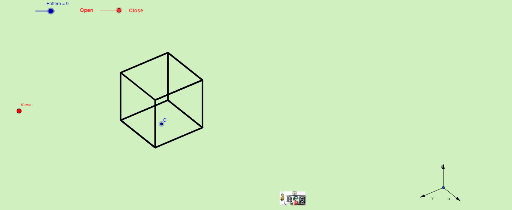
This example demonstrates the net of a cube and its folding process. Core mathematical concepts include polygons, solid geometry, and geometric transformations. Construction highlights involve commands like Vector, OrthogonalLine, Polygon, Midpoint, Translate, Segment, and Mirror in GeoGebra. Suitable for high school students learning solid geometry and spatial visualization skills.
GeoGebra Commands & Parameters
Vector(B_1, X) → uVector(B_1, Z) → wOrthogonalLine(Views, yAxis) → a_1OrthogonalLine(Views, xAxis) → b_1Vector(B_1, Y) → vPolygon(L, K, N, M) → poly1, l, k_1, n, mPolygon(K, P, Q, N) → poly2, k_2, p, q, n_1Polygon(L, M, S, R) → poly3, l_1, m_1, s, rPolygon(N, V, W, M) → poly4, n_2, v_1, w_1, m_2Polygon(K, T, U, L) → poly5, k_3, t, u_1, l_2Polygon(B, Q, P, A) → poly6, b_2, q_1, p_1, a_2Midpoint(R, M) → DTranslate(S, Vector[(-((2 * v)))]) → S'Segment(S, C) → eTranslate(M, Vector[(-2 * v)]) → M'Segment(M, E) → fSegment(E, C) → hTranslate(N, Vector[(-2 * v)]) → N'Translate(Q, Vector[(-2 * v)]) → Q'_1Segment(Q, F) → iSegment(N, G) → jSegment(G, F) → d_1Translate(Q, Vector[(-2 * v)]) → Q'_2Translate(B, Vector[(-2 * v)]) → B'_1Segment(B, I) → e_1Segment(I, H) → f_1Segment(H, Q) → g_1Translate(K, Vector[(2 * v)]) → K'Translate(P, Vector[(2 * v)]) → P'_1Segment(P, J) → h_1Segment(J, A_1) → i_1Segment(A_1, K) → j_1Segment(B, H_1) → s_1Segment(H_1, C_1) → cSegment(C_1, A) → r_1Midpoint(N, P) → D_1Midpoint(k_1) → F_1Translate(A, Vector[(2 * v)]) → A'Translate(P, Vector[(2 * v)]) → P'Segment(A, G_1) → t_1Segment(G_1, I_1) → c_2Segment(I_1, P) → d_2Segment(J, K_1) → f_2Segment(P, L_1) → e_2Segment(L_1, K_1) → g_2Segment(M, W) → h_2Mirror(L_1, F_1) → O_1Mirror(K_1, F_1) → P_1Segment(M, M_1) → i_2Segment(N_1, J_1) → j_2Segment(J_1, M_1) → p_2
AI Drawing Prompt Reference
Draw a cube net consisting of six squares that can be folded into a cube. Start by drawing six squares, then connect them using translation and mirroring operations to form the net structure. Pay attention to the connections and symmetry between each square.
The prompt above was compiled from the original drawing commands and is for reference only.