
Cube Cutting Example
Loading the math board and drawing, please wait…
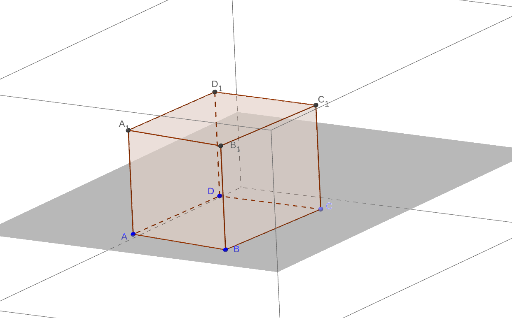
This example demonstrates a cube's cut. Key mathematical concepts include solid geometry. Using GeoGebra commands such as Line, OrthogonalLine, Point, Segment, Polygon, Prism, Intersect, Plane, etc., a cube and its cutting faces can be constructed. Suitable for high school or university solid geometry courses.
GeoGebra Commands & Parameters
Line(A, B) → aOrthogonalLine(A, a, space) → bOrthogonalLine(A, a, space) → cOrthogonalLine(B, a, space) → dOrthogonalLine(D, a, space) → eLine(B, e) → fPoint(f) → CSegment(D, A) → hSegment(A, B) → iSegment(B, C) → jSegment(C, D) → kPolygon(A, B, C, D) → poly1, a_1, b_1, d_1, c_1Prism(poly1, 5) → l, A_1, edgeAE, edgeBF, edgeDG, edgeCH, edgeEF, edgeFG, edgeGH, edgeEH, B_1, C_1, D_1, faceABFE, faceBDGF, faceCDGH, faceACHE, faceEFGHPoint(a_1) → IPoint(edgeAE) → JPoint(edgeGH) → KLine(J, I) → gLine(B_1, A_1) → mPoint(m) → LLine(K, L) → nLine(B_1, C_1) → pLine(B_1, B) → qIntersect(p, n) → MPoint(g) → NLine(M, N) → rPoint(edgeEH) → PPoint(r) → QPoint(b_1) → RSegment(I, R) → sSegment(K, Q) → tSegment(J, P) → e_1Segment(J, I) → f_1Segment(I, R) → g_1Segment(R, Q) → h_1Segment(Q, K) → i_1Segment(K, P) → j_1Segment(P, J) → k_1Point(p) → EPlane(J, I, R) → oPolygon(I, R, Q, K, P, J) → poly2, i_2, r_1, q_1, k_2, p_1, j_2
AI Drawing Prompt Reference
Draw a cube and demonstrate its cutting process. First, construct the edges and vertices of the cube. Then, create lines orthogonal to the cube's edges to define the cutting planes. Identify key intersection points using these orthogonal lines and connect them to form the cutting planes. Finally, combine the cutting planes with the cube to show the立体效果 of the cube being cut, highlighting the shape and position of the cutting planes.
The prompt above was compiled from the original drawing commands and is for reference only.